
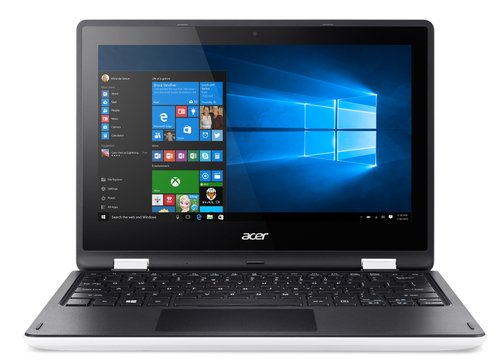
Acer N15Q9 — 11-Inch Entry-Level Chromebook with Intel Celeron
The Acer N15Q9 is a compact, entry-level Chromebook designed for basic computing tasks within a ChromeOS environment. Configured with an Intel Celeron processor, 2GB of RAM, and 16GB of eMMC storage, the N15Q9 operates as a lightweight cloud-dependent endpoint suited to web browsing, Google Workspace applications, and browser-based learning or productivity tools. Its 11-inch display and modest specifications place it at the lower end of the Chromebook category, targeting budget-conscious deployments where cost per unit is the primary procurement consideration.
The Acer N15Q9 is an older Chromebook model. Buyers should verify the device’s ChromeOS Auto-Update Expiry (AUE) date before deployment, as Google’s automatic update support for this model may have reached or be approaching its end-of-life date.
Processor and ChromeOS Performance
The Acer N15Q9 is powered by an Intel Celeron processor from an early dual-core platform, operating within ChromeOS’s lightweight architecture. ChromeOS places significantly lower demands on local hardware than Windows or macOS, allowing the Celeron to handle single-user web browsing, Google Docs, Google Sheets, email, and standard web-based application use without consistent performance issues under light workloads.
Intel HD Graphics are integrated into the processor, supporting standard display output and basic media rendering. Within the constraints of ChromeOS and the N15Q9’s hardware generation, performance is adequate for straightforward browser-based tasks. Consequently, the N15Q9 is best suited to environments where the application scope is deliberately narrow and workloads remain within basic web and productivity use.
Memory
The Acer N15Q9 is equipped with 2GB of RAM. This is the minimum functional memory configuration for ChromeOS operation. Within a tightly managed ChromeOS environment — accessing one or two browser tabs, a single Google Workspace application, and a communication tool — 2GB is operable. However, users should expect performance limitations when maintaining multiple active browser tabs, running concurrent applications, or using memory-intensive web platforms.
For deployments where the device’s application scope is strictly controlled — such as a single dedicated web-based tool or a kiosk-style configuration — 2GB RAM is manageable within ChromeOS’s memory management framework. Consequently, 2GB configurations are most appropriate where usage is intentionally limited rather than for general-purpose professional or educational multitasking.
Storage
The N15Q9 includes 16GB of eMMC storage. Consistent with ChromeOS’s cloud-first design, primary data storage is expected to reside in Google Drive or institutional cloud infrastructure rather than on the device locally. The 16GB volume accommodates ChromeOS system files, browser cache, and a limited number of locally cached documents for offline access.
As with all Chromebook eMMC configurations, storage is not user-upgradeable. Deployments should account for the constrained local capacity when planning offline content access requirements. A MicroSD card slot provides supplementary local storage expansion for media and offline content where supported.
Display
The Acer N15Q9 features an 11.6-inch display at HD (1366 × 768) resolution. This panel size and resolution are standard for the entry-level Chromebook category and render web content, documents, and standard media at sizes appropriate for single-user use. The compact 11-inch form factor contributes to the device’s low weight and reduced desk footprint.
The display is a standard non-touch panel. Interaction is via the keyboard and trackpad rather than direct screen input, distinguishing the N15Q9 from touch-enabled Chromebook variants in the same size category.
Build and Design
The Acer N15Q9 features a polycarbonate chassis consistent with its entry-level positioning. The device is designed for light-duty use in controlled environments. It does not carry MIL-STD durability certification and is not reinforced for the multi-user, high-turnover handling typical of education EE-grade Chromebooks. Additionally, the N15Q9 is best suited to desk-based or low-mobility use rather than frequent transport between locations.
The keyboard occupies a standard island-style layout appropriate for the 11-inch chassis. The compact form factor keeps the overall device footprint small, suitable for shared desk environments and limited workspace settings.
Connectivity and Ports
The Acer N15Q9 provides a basic port selection for its deployment context:
- USB-A (3.0) — connects peripherals, storage devices, and input accessories
- USB-A (2.0) — additional peripheral connectivity for legacy accessories
- HDMI — enables external display connection for projectors and monitors
- MicroSD card slot — provides local storage expansion for offline content
- 3.5mm audio combo jack — connects headphones and headsets
Wireless connectivity includes Wi-Fi (802.11ac) and Bluetooth. The N15Q9 does not include a wired Ethernet port natively; a USB to Ethernet adapter provides wired LAN access where required. The absence of USB-C ports reflects the device’s older hardware generation.
ChromeOS and Fleet Management
Despite its modest hardware specification, the N15Q9 benefits from ChromeOS’s platform-level management capabilities where the AUE date has not been reached:
- Google Admin Console — centralised policy enforcement and application management across enrolled devices
- Automatic background updates — ChromeOS updates without user intervention, removing patch management overhead
- Managed Guest Session — supports shared device use with isolated, data-free sessions per user
- Auto-enrolment — devices enrol automatically into institutional management on first boot when pre-provisioned
These capabilities partially offset the hardware limitations of the N15Q9 in managed deployment contexts, provided the device remains within its ChromeOS update support window.
Auto-Update Expiry Consideration
The Acer N15Q9 is an older Chromebook model. Google provides ChromeOS automatic updates for a defined period from a device’s platform introduction date, after which the device no longer receives OS updates, security patches, or new feature support. This Auto-Update Expiry (AUE) date is a critical procurement consideration for institutional and business deployments.
Buyers should verify the current AUE status of the N15Q9 against Google’s published AUE schedule before deployment. Devices that have reached AUE are not recommended for environments handling sensitive data, requiring current security patches, or accessing modern web applications that depend on an up-to-date ChromeOS version.
Battery and Power
The Acer N15Q9 delivers an estimated battery runtime of approximately 7–9 hours under light mixed-use conditions. The Intel Celeron’s low power draw contributes to adequate battery performance for single-session desk use. The device charges via its dedicated AC power adapter.
Ideal Users
The Acer N15Q9 is suited to a narrow set of deployment profiles where its hardware constraints align with operational requirements:
- Single-purpose kiosk or display deployments — Where the device operates a single web-based application or information display in a controlled environment, the 2GB RAM and Celeron processor are sufficient. ChromeOS kiosk mode restricts operation to a single designated application, keeping resource demands within the hardware’s operational range.
- Very light personal or home use — For individuals requiring basic web browsing, email access, and Google Workspace document viewing with minimal concurrent application use, the N15Q9 provides functional ChromeOS access at a low acquisition cost. Usage should be limited to light, sequential tasks rather than concurrent multitasking.
- Budget-constrained deployments with strictly limited application scope — In environments where the device’s application scope is rigidly controlled to one or two browser-based tools — such as a specific learning platform or data entry form — the N15Q9’s hardware is adequate. Deployments outside this narrow scope will encounter consistent performance limitations.
- Spare or backup device pools — The N15Q9 suits use as a reserve device for temporary access needs where primary devices are unavailable. Its low acquisition cost and ChromeOS managed guest session support make it functional in short-term shared use scenarios within its AUE window.
Technical Specifications
Processor
| Attribute | Detail |
|---|---|
| Processor | Intel Celeron (dual-core, generation varies by sub-configuration) |
| Graphics | Intel HD Graphics (integrated) |
| TDP | Low-power platform |
Memory
| Attribute | Detail |
|---|---|
| Installed RAM | 2GB |
| Memory Type | DDR3L |
| Configuration | Soldered (non-upgradeable) |
Storage
| Attribute | Detail |
|---|---|
| Storage Capacity | 16GB |
| Storage Type | eMMC |
| Expandable Storage | MicroSD card slot |
Display
| Attribute | Detail |
|---|---|
| Screen Size | 11.6 inches |
| Resolution | 1366 × 768 (HD) |
| Aspect Ratio | 16:9 |
| Touch | No |
| Panel Type | Standard TN/IPS (configuration-dependent) |
Ports and Connectivity
| Attribute | Detail |
|---|---|
| USB-A 3.0 | 1× USB-A 3.0 |
| USB-A 2.0 | 1× USB-A 2.0 |
| HDMI | Yes |
| MicroSD | Yes |
| Audio | 3.5mm combo jack |
| Ethernet | Not native — USB adapter required |
| Wi-Fi | 802.11ac (Wi-Fi 5) |
| Bluetooth | Yes |
| USB-C | Not present |
Power and Battery
| Attribute | Detail |
|---|---|
| Estimated Battery Life | Approximately 7–9 hours (light use) |
| Charging Interface | AC power adapter (barrel connector) |
Build and Compliance
| Attribute | Detail |
|---|---|
| Chassis Material | Polycarbonate |
| Durability Standard | None (non-EE consumer grade) |
| Operating System | ChromeOS |
| Form Factor | Clamshell laptop |
| Weight | Approximately 1.2 kg (2.65 lbs) |
| Auto-Update Expiry (AUE) | Verify against Google AUE schedule before deployment |
Reviews
There are no reviews yet.