

Panasonic Let’s Note XZ6 — Ultra-Lightweight Business Laptop with Intel Core i5, 12-Inch Display, and No AC Adaptor
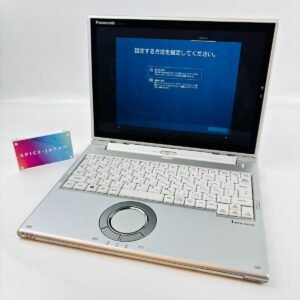
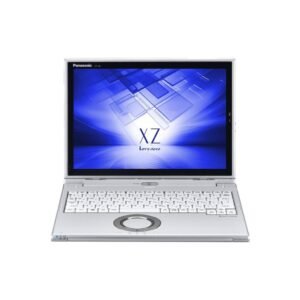
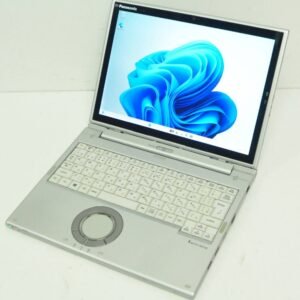
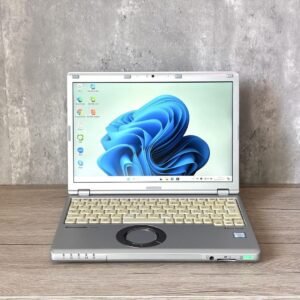
The Panasonic Let’s Note XZ6 is a compact, ultra-lightweight business laptop built for mobile professionals operating across varied work environments. This configuration pairs an Intel Core i5 processor, 4GB of RAM, and a 128GB storage drive within a 12-inch magnesium alloy chassis. Notably, this variant ships without an AC adaptor — a procurement detail that directly affects deployment planning, charging infrastructure requirements, and total cost of ownership calculations for IT departments managing device fleets.
The XZ6 sits within Panasonic’s flagship Let’s Note XZ series, prioritising extreme portability, rugged durability, and long battery runtime as its defining engineering characteristics. Consequently, the no-adaptor configuration suits organizations that already hold compatible NEC or Panasonic proprietary AC adaptors across existing device inventories, or procurement teams sourcing units at reduced cost for bulk fleet deployments.
AC Adaptor — Procurement and Deployment Considerations
The absence of an AC adaptor is the defining procurement characteristic of this Let’s Note XZ6 variant. This configuration appears in several common deployment scenarios:
- Bulk fleet procurement — Organizations purchasing multiple units where compatible adaptors are already available from existing Panasonic Let’s Note inventory reduce per-unit cost by sourcing no-adaptor configurations
- Replacement or supplementary units — IT departments issuing a second or replacement device to an existing XZ6 user where the original adaptor remains in service
- Refurbished or grade-A refurb channels — No-adaptor units are common in certified refurbished business laptop markets, where adaptors are sold separately or matched from existing stock
- Docking station deployments — Organizations using Thunderbolt 3 or USB-C docking stations may power the XZ6 entirely through the dock, eliminating the need for a dedicated barrel-connector AC adaptor
The Let’s Note XZ6 uses a proprietary Panasonic AC adaptor with specific voltage and connector requirements. Organizations procuring this no-adaptor variant should confirm adaptor compatibility — specifically 16V DC input via Panasonic’s proprietary connector — before deployment. Using an incompatible third-party adaptor risks damage to the charging circuit and voids device warranty coverage.
Furthermore, the XZ6’s Thunderbolt 3 USB-C port supports USB Power Delivery charging on compatible configurations. This enables charging via a USB-C PD adaptor rated at 45W or above, providing an alternative power source when the proprietary adaptor is unavailable.
Processor and Computing Architecture
The Panasonic Let’s Note XZ6 is powered by an Intel Core i5-7300U processor from Intel’s 7th Generation Kaby Lake platform. This U-series CPU balances sustained computing performance with minimal thermal output — a critical engineering requirement within the XZ6’s weight-optimised compact chassis.
The Core i5-7300U in the Let’s Note XZ6 delivers:
- Dual-core processing with Hyper-Threading across 4 logical threads
- Base clock speed of 2.6 GHz
- Intel Turbo Boost acceleration up to 3.5 GHz under peak single-core demand
- Intel HD Graphics 620 with 24 execution units
- 3MB Intel Smart Cache for rapid repeated data access
Therefore, the Let’s Note XZ6 handles the full range of standard mobile business workloads. Document authoring, spreadsheet analysis, email management, video conferencing, browser-based enterprise platforms, and presentation delivery all operate within the processor’s sustained performance envelope — including during extended battery-powered sessions away from mains power.
Memory Configuration
The Let’s Note XZ6 ships with 4GB of LPDDR3 RAM. This specification reflects the XZ6’s mobility-first engineering approach, where power efficiency and chassis weight take deliberate precedence over maximum multitasking capacity.
In practical terms, 4GB RAM supports:
- Microsoft Office Suite with moderate document and workbook complexity
- Browser sessions sustaining 6–8 active tabs alongside productivity applications
- Email clients and calendar tools running as background processes
- Single-focus professional workflows typical of field-based and travel-oriented roles
It is important to note that the Let’s Note XZ6 memory is soldered to the motherboard on most configurations. Consequently, RAM is not user-upgradeable after purchase. Organizations procuring the XZ6 should evaluate application memory requirements carefully at the point of device selection, particularly for workflows involving simultaneous use of memory-intensive enterprise platforms.
Storage Configuration
The Panasonic Let’s Note XZ6 includes a 128GB storage drive. Given the XZ6’s form factor and weight constraints, this is typically a solid-state solution delivering sequential read speeds exceeding 500MB/s. Fast storage access results in responsive boot times, rapid application launches, and efficient file handling during time-sensitive mobile work scenarios.
The 128GB capacity accommodates:
- Windows operating system and standard business application installations
- A focused working set of professional documents, presentations, and reference files
- Locally installed productivity and communication software
- Offline synchronized folders for low-connectivity travel environments
Organizations deploying the XZ6 at this storage tier should pair the device with cloud storage platforms or VPN-connected enterprise network drives to supplement the constrained local storage footprint across broader file library access requirements.
Display and Visual Workspace
The Let’s Note XZ6 features a 12-inch non-touch display in this standard configuration. The panel uses IPS technology with a matte anti-glare surface treatment, delivering consistent visual quality for document-intensive and communication-focused professional workflows.
The 12-inch display on the Let’s Note XZ6 provides:
- Full HD or WUXGA resolution (1920×1080 or 1920×1200 depending on panel variant)
- IPS panel technology for consistent colour accuracy across wide viewing angles
- Matte anti-glare surface treatment reducing reflections during outdoor and transit use
- Standard laptop hinge configuration optimised for keyboard-driven workflows
The compact 12-inch panel suits focused single-application work during travel — reviewing documents, managing correspondence, and accessing enterprise portals on aircraft tray tables or in transit seating. External display output via HDMI extends the workspace to office monitors or presentation displays at fixed locations.
Ultra-Lightweight Chassis and Durability
The Panasonic Let’s Note XZ6 is constructed around a magnesium alloy chassis. This material delivers structural rigidity at significantly lower weight than aluminium alternatives, contributing to the device’s total weight of approximately 769g to 870g depending on battery configuration.
The Let’s Note XZ6 meets MIL-STD-810G military-grade durability certification, covering resistance to:
- Mechanical shock from drops and transit impacts
- Vibration during transportation across vehicles, aircraft, and handling environments
- Extreme temperature variation between indoor and outdoor conditions
- Humidity and moisture exposure across varied geographic climates
As a result, the XZ6 withstands the physical demands of frequent travel and field deployment that standard business laptops are not rated to endure. This certification is particularly relevant for professionals whose devices are routinely transported across multiple locations throughout the working day.
Battery Life and Mobile Power
Battery endurance is a defining engineering priority of the Let’s Note XZ6. Panasonic achieves this through the combination of the 15W Core i5-7300U, efficient LPDDR3 memory, and proprietary power management firmware. Notably, the XZ6’s exceptional battery runtime partially offsets the no-adaptor configuration — professionals can complete full working days without requiring access to the proprietary charger.
The Let’s Note XZ6 delivers:
- Estimated battery runtime of approximately 15–20 hours on the standard battery configuration
- Extended battery variants pushing runtime beyond 20 hours on select configurations
- Rapid charge support returning significant capacity within 60 minutes when a compatible adaptor is available
- Battery wear levelling for long-term cell health across multi-year device deployments
Consequently, the XZ6’s battery endurance reduces daily charging dependency — a practical advantage that makes the no-adaptor configuration viable for single-day and multi-session professional use without immediate access to mains power.
Connectivity and Port Selection
The Panasonic Let’s Note XZ6 provides a targeted port selection balanced against its ultra-slim chassis constraints. These include:
- USB 3.0 Type-A ports for peripheral and external storage connections
- USB Type-C with Thunderbolt 3 for high-speed data transfer, external display output, and USB-PD charging
- HDMI output for monitor and projector connections
- RJ-45 Gigabit Ethernet via fold-out integrated port or included adapter
- microSD card reader for portable storage expansion and file transfers
- 3.5mm audio combo jack for headsets and conferencing equipment
- Wi-Fi 802.11 a/b/g/n/ac dual-band wireless networking
- Bluetooth 4.2 for wireless peripheral and audio device connectivity
The Thunderbolt 3 USB-C port is particularly significant in the no-adaptor context. A USB-C PD-compatible charger or docking station rated at 45W or above can power the XZ6 through this port, providing a practical alternative charging pathway without the proprietary barrel connector adaptor.
Security Features
The Let’s Note XZ6 incorporates hardware security features appropriate for mobile professionals handling sensitive data across locations. These include:
- TPM 2.0 — Enables BitLocker hardware-based drive encryption and enterprise security policy compliance
- Fingerprint reader — Supports Windows Hello biometric authentication for fast, secure device access
- Kensington Lock slot — Provides physical security tethering at fixed work locations
- BIOS-level password protection — Restricts unauthorized boot and configuration access
For professionals operating under compliance frameworks or carrying confidential data during travel, TPM 2.0 combined with BitLocker encryption maintains device-level data protection in the event of physical device loss or theft in transit.
Ideal Users for the Panasonic Let’s Note XZ6 No-Adaptor Configuration
The following professionals and deployment contexts are well-matched to this specific variant:
- IT fleet managers procuring bulk device replacements — Organizations with existing Panasonic Let’s Note XZ-series adaptors in inventory reduce per-unit procurement cost by sourcing no-adaptor configurations. The Core i5 and MIL-STD-810G chassis deliver consistent hardware profiles across standardized fleet deployments.
- Existing Let’s Note XZ users receiving supplementary units — Professionals already operating an XZ6 with an active adaptor can deploy a second unit without redundant charging hardware. The 128GB SSD and 15–20 hour battery support parallel device use across extended travel assignments.
- Organizations deploying Thunderbolt 3 docking stations — IT environments standardized on USB-C or Thunderbolt 3 docking infrastructure can power the XZ6 entirely through the dock, eliminating proprietary adaptor dependency at fixed workstations.
- Frequent business travellers prioritising battery-first mobility — The 15–20 hour runtime reduces daily charging dependency, making the absence of an included adaptor less operationally significant for single-day travel schedules. MIL-STD-810G durability withstands transit handling demands.
- Cost-conscious SMB procurement teams — Smaller organizations sourcing certified refurbished units at reduced cost benefit from the no-adaptor configuration when compatible chargers are already available from prior device generations or shared charging pools.
Technical Specifications
Processor
| Specification | Detail |
|---|---|
| Processor Model | Intel Core i5-7300U |
| Architecture | Intel 7th Generation Kaby Lake |
| Base Clock Speed | 2.6 GHz |
| Turbo Boost | Up to 3.5 GHz |
| Cores / Threads | Dual-core / 4 threads (Hyper-Threading) |
| Integrated Graphics | Intel HD Graphics 620 |
| Cache | 3MB Intel Smart Cache |
| TDP | 15W (U-series) |
Memory
| Specification | Detail |
|---|---|
| Installed RAM | 4GB |
| Memory Type | LPDDR3 |
| Upgradeable | No — soldered (configuration-dependent) |
| Maximum Supported RAM | 4GB (fixed on soldered configurations) |
Storage
| Specification | Detail |
|---|---|
| Storage Capacity | 128GB |
| Storage Type | SSD (solid-state) |
| Typical Sequential Read | 500MB/s+ |
| Interface | SATA III or PCIe NVMe (variant-dependent) |
| Recommended Complement | Cloud storage or enterprise network drives |
Display
| Specification | Detail |
|---|---|
| Screen Size | 12 inches |
| Resolution | 1920×1200 WUXGA or 1920×1080 FHD (panel-dependent) |
| Panel Type | IPS |
| Touch Input | None — standard non-touch configuration |
| Surface Finish | Matte anti-glare |
| Hinge | Standard laptop hinge |
Connectivity
| Specification | Detail |
|---|---|
| USB Ports | USB 3.0 Type-A × 2; USB Type-C Thunderbolt 3 × 1 |
| Video Output | HDMI |
| Network | RJ-45 Gigabit Ethernet (fold-out or adapter) |
| Wireless | Wi-Fi 802.11 a/b/g/n/ac dual-band |
| Bluetooth | Bluetooth 4.2 |
| Audio | 3.5mm combo jack |
| Card Reader | microSD slot |
Power and Charging
| Specification | Detail |
|---|---|
| AC Adaptor Included | No — not included in this configuration |
| Proprietary Adaptor Spec | 16V DC via Panasonic proprietary connector |
| Alternative Charging | USB-C Power Delivery via Thunderbolt 3 port (45W+ recommended) |
| Docking Station Charging | Supported via compatible Thunderbolt 3 dock |
Security
| Specification | Detail |
|---|---|
| TPM | TPM 2.0 |
| Biometric Authentication | Fingerprint reader |
| Physical Lock | Kensington Lock slot |
| BIOS Security | Password protection |
Durability
| Specification | Detail |
|---|---|
| Chassis Material | Magnesium alloy |
| Military Standard | MIL-STD-810G certified |
| Drop and Shock | Rated for mechanical shock and vibration |
| Environmental Rating | Temperature variation and humidity resistance |
Battery
| Specification | Detail |
|---|---|
| Battery Type | Lithium-ion |
| Estimated Runtime | 15–20 hours (standard battery) |
| Extended Battery | Available on select variants |
| Rapid Charge | Significant charge recovery within 60 minutes |
| Battery Management | Wear levelling for multi-year deployment health |
Physical Specifications
| Specification | Detail |
|---|---|
| Form Factor | Ultra-lightweight compact business laptop |
| Screen Size Class | 12-inch |
| Weight | Approximately 769g – 870g (battery-dependent) |
| Keyboard | Compact full-function keyboard |
| Operating System | Windows 10 Pro (configuration-dependent) |
Reviews
There are no reviews yet.