
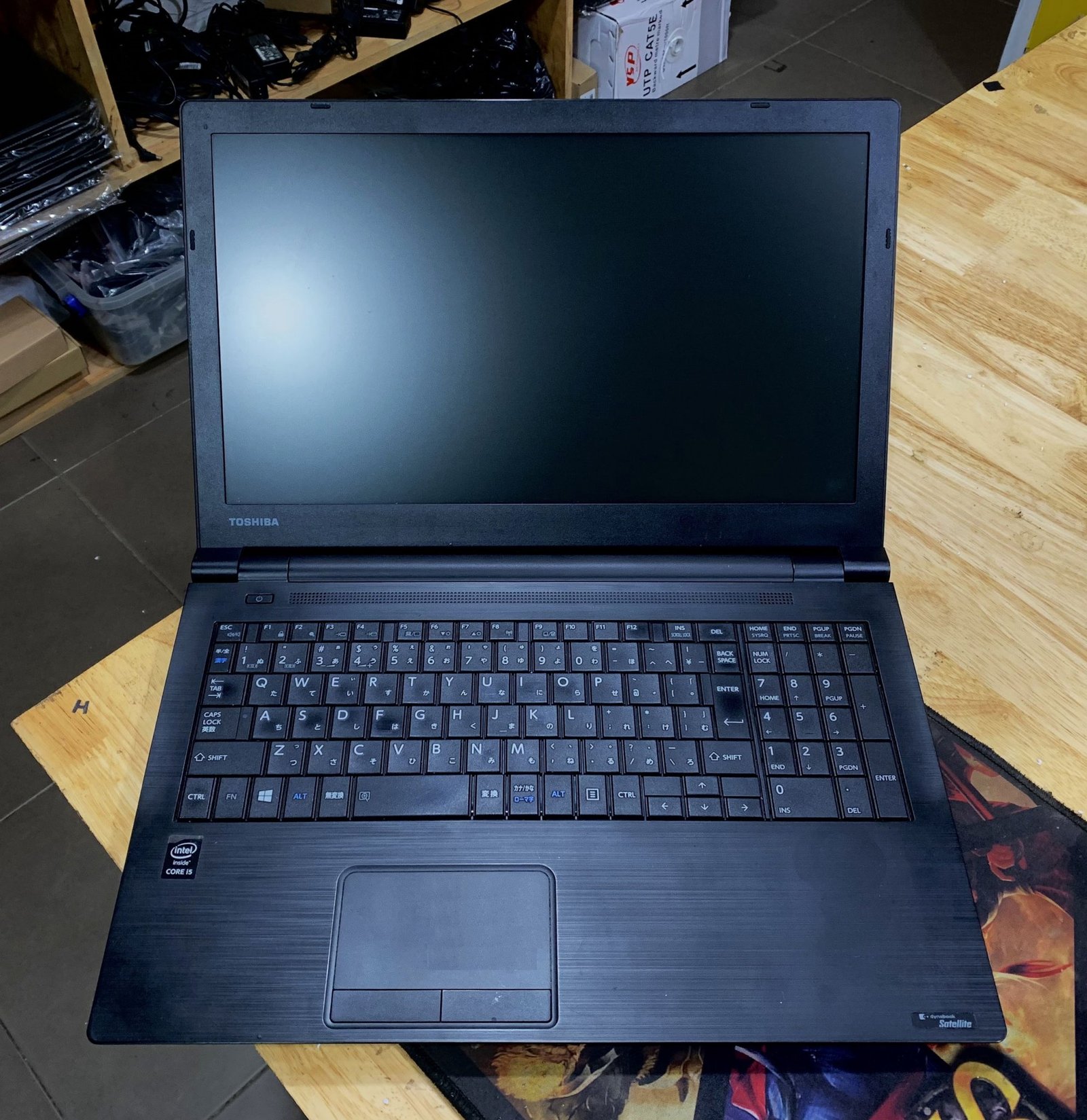
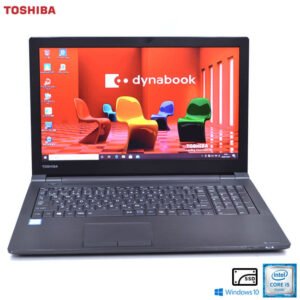
Toshiba Dynabook B65/M — Business Laptop with Intel Core i3, 8GB RAM, and 15.6-Inch Display
The Toshiba Dynabook B65/M is a full-size business laptop designed for office-based professionals and organisations that require dependable everyday computing within a practical, cost-conscious hardware profile. This configuration combines an Intel Core i3 processor, 8GB of RAM, and a 128GB storage drive within a 15.6-inch chassis built to Toshiba’s Dynabook business standards. Consequently, the B65/M targets organisations deploying standardised device fleets across administrative, clerical, and general office roles where consistent performance and manageable procurement costs are equally important.
The B65/M sits within Toshiba’s Dynabook B series — a lineup positioned toward value-oriented business procurement in the Japanese and regional enterprise markets. As a result, the Dynabook B65/M delivers a full-size working environment with adequate processing resources for standard productivity workloads, making it a practical choice for IT departments managing large-scale device rollouts across diverse organisational functions.
Processor and Computing Architecture
The Toshiba Dynabook B65/M is powered by an Intel Core i3 processor. Depending on the specific production revision, this CPU falls within Intel’s 6th or 7th Generation Core architecture — typically the Intel Core i3-6006U or i3-7130U.
The Core i3 in the Dynabook B65/M provides:
- Dual-core processing with Hyper-Threading across 4 logical threads
- Base clock speed of 2.0 GHz to 2.7 GHz depending on generation
- No Turbo Boost — fixed clock speed operation across all workload intensities
- Intel HD Graphics 520 or HD Graphics 620 integrated GPU
- 3MB Intel Smart Cache
It is important to note that the Core i3 does not support Intel Turbo Boost technology. Unlike Core i5 and i7 processors, the i3 operates at a fixed clock speed regardless of workload demand. Consequently, the Dynabook B65/M delivers consistent, predictable performance across standard office tasks rather than peak burst performance for computationally intensive workflows. This characteristic makes the B65/M well-suited to roles with defined, repeatable computing tasks rather than variable or unpredictable workload profiles.
Memory and Multitasking
The Dynabook B65/M ships with 8GB of DDR4 RAM. This memory configuration provides a solid foundation for concurrent business application use, compensating for the Core i3’s fixed clock speed by ensuring sufficient memory allocation across simultaneously running processes.
Specifically, 8GB RAM allows the B65/M to sustain:
- Microsoft Office Suite with multiple documents and workbooks open simultaneously
- Browser sessions with 10–15 active tabs running alongside productivity applications
- Background endpoint security agents and IT management processes
- Email clients and calendar applications running concurrently with primary tools
- Standard enterprise intranet and web-based platform access
Furthermore, the Dynabook B65/M typically supports memory expansion via an available SO-DIMM slot. This allows IT administrators to upgrade total system RAM to 16GB, extending device deployment viability as application memory overhead increases across successive software update cycles.
Storage — 128GB Configuration
The Toshiba Dynabook B65/M includes a 128GB storage drive in this configuration. Depending on the specific production unit, this may be a solid-state drive or an eMMC storage solution. At this capacity, the drive accommodates the operating system, standard business application installations, and a focused working set of professional documents and files.
The 128GB capacity suits deployment contexts where:
- Primary file libraries are stored on network drives, enterprise file servers, or cloud storage platforms
- Device use is focused on web-based or thin-client enterprise applications with minimal local storage dependency
- IT departments manage centralised storage infrastructure that reduces per-device local storage requirements
- Organisations prioritise cost-efficient procurement over expanded local storage headroom
Consequently, organisations deploying the B65/M at this storage tier should pair the device with accessible network drives or cloud storage platforms. This ensures professionals retain access to broader file libraries without exceeding local capacity constraints during daily workflows.
Display and Visual Workspace
The Dynabook B65/M features a 15.6-inch display. This full-size panel delivers a comfortable viewing area for document editing, spreadsheet navigation, data entry, and internal communication tools throughout the working day.
The 15.6-inch display on the B65/M provides:
- HD resolution at 1366×768 or Full HD at 1920×1080 depending on panel configuration
- TN or IPS panel technology depending on the specific production variant
- Matte surface finish reducing reflections under standard office lighting conditions
- Standard laptop hinge configuration optimised for desk-based workflows
The full-size 15.6-inch panel additionally accommodates a full-size keyboard layout. Select B65/M configurations include a dedicated numeric keypad, directly supporting roles that rely on high-volume numerical data entry across finance, administration, and data processing functions. Furthermore, the B65/M supports external display output via HDMI and VGA, ensuring compatibility across both modern and legacy presentation infrastructure in mixed office environments.
Build and Chassis Design
The Toshiba Dynabook B65/M follows Dynabook’s established business chassis design principles. The unit uses a practical matte finish that resists fingerprint visibility during standard office handling. The keyboard provides adequate key travel and spacing for extended typing sessions across correspondence, data entry, and document authoring workloads.
Additionally, the B65/M is designed with IT serviceability as a consideration. The base panel provides access to RAM slots, the storage bay, and cooling components. This design reduces maintenance turnaround times for IT departments managing large device fleets, supporting component-level repair and upgrade rather than full unit replacement across the device lifecycle.
Connectivity and Port Selection
The Toshiba Dynabook B65/M provides a comprehensive port selection aligned with enterprise peripheral and network requirements. These include:
- USB 3.0 Type-A ports for high-speed peripheral and external storage connections
- USB 2.0 Type-A port for legacy device compatibility
- HDMI output for external monitor and projector connections
- VGA output for compatibility with older display infrastructure
- RJ-45 Gigabit Ethernet for wired enterprise network access
- SD card reader for document and media file transfers
- 3.5mm audio combo jack for headsets and conferencing equipment
- Wi-Fi 802.11 a/b/g/n/ac dual-band wireless networking
- Bluetooth 4.x for wireless peripheral connectivity
- Integrated webcam for video conferencing participation
The RJ-45 Gigabit Ethernet port is particularly relevant in enterprise environments where IT security policies mandate wired network connections. Dual video output — HDMI and VGA — furthermore ensures compatibility across both modern and legacy presentation infrastructure in mixed office and meeting room environments.
Security Features
The Dynabook B65/M incorporates hardware security features suited to business deployment environments. These include:
- TPM (Trusted Platform Module) — Supports hardware-based drive encryption via BitLocker and enterprise security frameworks
- Kensington Lock slot — Enables physical device tethering in shared or open-plan office spaces
- BIOS-level password protection — Restricts unauthorized system boot and configuration access
- Fingerprint reader (select configurations) — Supports Windows Hello biometric authentication
Together, these features allow IT administrators to enforce device encryption, access control policies, and remote management configurations across managed device fleets without relying solely on software-based security measures.
Battery and Power
The Dynabook B65/M includes a built-in lithium-ion battery. Under typical office workloads, the device delivers an estimated 4–6 hours of runtime. This range covers standard desk-based working sessions between fixed power access points in office environments.
The device ships with a Toshiba AC adapter. Power management settings within Windows allow IT administrators to configure battery charge thresholds and performance profiles suited to always-plugged-in deployment scenarios — preserving long-term battery cell health across extended multi-year device lifecycles.
Ideal Users for the Toshiba Dynabook B65/M
The following professionals and deployment contexts are well-matched to the B65/M based on its hardware configuration and value-oriented positioning:
- Administrative and clerical professionals — The 8GB RAM handles simultaneous Office Suite tasks, email management, calendar tools, and intranet platforms without performance bottlenecks. The Core i3’s fixed clock speed delivers predictable, consistent performance across repeatable daily workflows. The full-size 15.6-inch screen reduces eye strain across document-heavy workdays.
- Data entry and back-office staff — The numeric keypad configuration (where available) accelerates high-volume numerical data entry. The 8GB RAM sustains concurrent operation of data entry platforms, spreadsheet tools, and reference applications. The 128GB storage holds the operating system and application suite with network drives covering primary file library access.
- IT departments managing large standardised device fleets — The B65/M’s consistent hardware profile, accessible service panel, and TPM security support simplify fleet deployment, maintenance, and compliance documentation. The cost-efficient Core i3 and 128GB configuration reduces per-unit procurement cost for bulk rollouts across general office roles.
- Education sector administrative staff — Administrative teams in schools and universities benefit from the large display for reviewing records and correspondence, the numeric keypad for fee and data processing, and the durable chassis built for repeated daily use across shared device environments.
- SMB general workforce deployments — Small and medium businesses provisioning standardised employee devices benefit from the B65/M’s reliable hardware profile. The Core i3 and 8GB configuration meets operational requirements for Microsoft 365, browser-based business platforms, and standard communication tools across general office roles.
Technical Specifications
Processor
| Specification | Detail |
|---|---|
| Processor Family | Intel Core i3 |
| Specific Model | Core i3-6006U or i3-7130U (revision-dependent) |
| Architecture | Intel 6th or 7th Generation |
| Base Clock Speed | 2.0 GHz – 2.7 GHz (generation-dependent) |
| Turbo Boost | Not supported — fixed clock speed |
| Cores / Threads | Dual-core / 4 threads (Hyper-Threading) |
| Integrated Graphics | Intel HD Graphics 520 or HD Graphics 620 |
| Cache | 3MB Intel Smart Cache |
| TDP | 15W (U-series) |
Memory
| Specification | Detail |
|---|---|
| Installed RAM | 8GB |
| Memory Type | DDR4 SO-DIMM |
| Memory Speed | 2133 MHz – 2400 MHz |
| Memory Slots | 1 occupied; 1 available (configuration-dependent) |
| Maximum Supported RAM | Up to 16GB |
Storage
| Specification | Detail |
|---|---|
| Storage Capacity | 128GB |
| Storage Type | SSD or eMMC (configuration-dependent) |
| Interface | SATA III or eMMC (variant-dependent) |
| Recommended Complement | Network drives or cloud storage platforms |
Display
| Specification | Detail |
|---|---|
| Screen Size | 15.6 inches |
| Resolution | 1366×768 HD or 1920×1080 FHD (panel-dependent) |
| Panel Type | TN or IPS (varies by configuration) |
| Surface Finish | Matte anti-glare |
| Aspect Ratio | 16:9 |
Connectivity
| Specification | Detail |
|---|---|
| USB Ports | USB 3.0 Type-A × 2; USB 2.0 Type-A × 1 |
| Video Output | HDMI + VGA |
| Network | RJ-45 Gigabit Ethernet |
| Wireless | Wi-Fi 802.11 a/b/g/n/ac dual-band |
| Bluetooth | Bluetooth 4.x |
| Audio | 3.5mm combo jack |
| Card Reader | SD card slot |
| Webcam | Integrated |
Security
| Specification | Detail |
|---|---|
| TPM | TPM 1.2 or TPM 2.0 (revision-dependent) |
| Physical Lock | Kensington Lock slot |
| BIOS Security | Password protection |
| Biometric Authentication | Fingerprint reader (select configurations) |
Battery and Power
| Specification | Detail |
|---|---|
| Battery Type | Lithium-ion |
| Estimated Runtime | 4–6 hours (moderate office workload) |
| Power Adapter | Toshiba proprietary AC adapter |
Physical Specifications
| Specification | Detail |
|---|---|
| Form Factor | Full-size business laptop |
| Screen Size Class | 15.6-inch |
| Keyboard | Full-size with optional numeric keypad |
| Weight | Approximately 2.1kg – 2.4kg (configuration-dependent) |
| Operating System | Windows 10 Pro (configuration-dependent) |
 No products in the cart.
Reviews
There are no reviews yet.