
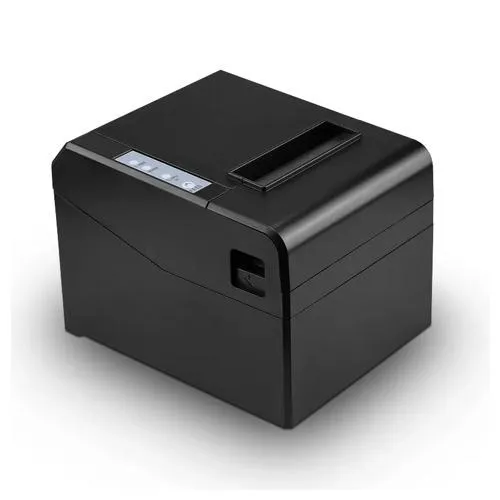
Syble XP-80B — 80mm Desktop Thermal Receipt Printer (USB / Serial / Ethernet)
The Syble XP-80B is an 80mm direct thermal receipt printer designed for point-of-sale environments in retail, hospitality, and service businesses. It prints at up to 250mm per second on 80mm thermal paper rolls, requires no ink cartridges or ribbons, and connects to POS systems via USB, serial (RS-232), or Ethernet — with all three interfaces available on this variant for maximum deployment flexibility. The printer is ESC/POS compatible, supports cash drawer activation via RJ-11 port, and operates under Windows, Linux, and Android environments.
The three-interface configuration of the XP-80B is its primary deployment advantage over single or dual-interface variants. USB provides direct workstation connection for single-register setups; the serial port supports legacy POS terminals and systems that output to RS-232; and the Ethernet port enables the printer to be shared across multiple POS terminals or accessed from anywhere on the local network — making it suitable for restaurant kitchens, multi-counter retail, and networked POS deployments where one printer must serve more than one source.
Direct Thermal Printing — No Ink or Ribbon
The XP-80B uses direct thermal printing technology — heat from the printhead activates the thermally sensitive coating on the paper to produce the printed image, without ink, toner, or ribbon cartridges. This has three operational implications:
Zero consumable cost beyond paper — There are no ink or ribbon replacements to purchase, stock, or manage. The only consumable is the thermal paper roll itself.
Lower maintenance — The absence of ink-related components (cartridge contacts, ribbon spindles, head cleaning requirements) reduces the maintenance interventions required compared to inkjet or impact printers in the same environment.
Noise and speed — Direct thermal printing is silent in operation and inherently fast — print speed is limited only by the paper feed mechanism rather than the time required to deposit ink. The XP-80B achieves up to 250mm/s, producing a typical 10cm receipt in under half a second.
The trade-off of thermal printing is that receipt longevity is affected by heat and light exposure — thermal paper receipts fade over time and should not be stored in warm or sunlit environments for extended periods. For archival receipt copies, printing to a secondary medium (PDF, email) is recommended.
Print Speed and Throughput
The XP-80B prints at a maximum speed of 250mm per second. At a typical receipt length of 100–150mm, this produces a complete receipt in under one second from data receipt to paper cut — appropriate for high-throughput checkout environments where queue time is directly affected by printer speed.
For comparison, lower-specification thermal receipt printers in the same category typically operate at 150–200mm/s. The 250mm/s ceiling of the XP-80B provides a meaningful throughput advantage in busy retail counters and restaurant point-of-sale positions where multiple receipts are printed in rapid succession during peak periods.
Auto-Cutter
The XP-80B includes a built-in automatic paper cutter. After each print job, the cutter severs the receipt cleanly from the paper roll without operator intervention. This eliminates the need for the cashier to manually tear receipts, reduces counter time per transaction, and produces a consistently trimmed receipt edge rather than a torn edge.
The auto-cutter is triggered by the ESC/POS cut command issued by the POS software at the end of each receipt job. Both full-cut (complete separation) and partial-cut (leaving a small connecting strip) options are typically available via ESC/POS command, depending on counter workflow preference.
Three-Interface Connectivity
USB — The primary connection for direct workstation-to-printer setups. The printer appears as a standard USB device and is recognised by Windows, Linux, and Android with appropriate drivers. USB is the simplest configuration for single-register retail environments.
Serial (RS-232) — DB9 female socket, RS-232 compatible. Serial port connectivity is used for legacy POS terminals and embedded systems that communicate via COM port rather than USB. It is also used for certain standalone POS hardware that predates USB interfaces. The serial connection provides reliable point-to-point communication for these environments without requiring USB host support on the POS terminal.
Ethernet (LAN) — RJ45 network port enables the printer to connect to the local area network as a network-accessible printing device. The printer is assigned an IP address (configurable via the printer’s self-test page or web configuration interface) and can receive print jobs from any device on the same network with appropriate driver or software configuration.
Ethernet connectivity enables the following deployment scenarios that USB-only printers cannot support:
- Multi-terminal shared printing — Multiple POS terminals or computers sending receipts to a single shared printer, without any computer acting as a print server
- Kitchen order printing — Restaurant order management systems routing kitchen dockets from the front-of-house POS to a printer mounted in the kitchen, across the premises network
- Cloud POS and web-based systems — Web-based POS software that routes print jobs over the network rather than to a locally connected USB device
- Remote printer management — IT staff configuring or monitoring the printer’s IP address and settings from any network-connected workstation
Cash Drawer Interface
The XP-80B includes a cash drawer kick port via RJ-11 (6-pin telephone-style) connector. When the POS software issues an ESC/POS cash drawer open command, the printer delivers a voltage pulse through the RJ-11 port that activates the solenoid in a connected cash drawer, releasing the drawer. This standard interface is compatible with the majority of commercially available 24V cash drawers that use RJ-11/RJ-12 connection.
The cash drawer opens at the point of a completed transaction — triggered by the same print job that produces the receipt — without requiring a separate manual key turn or separate cash drawer controller hardware.
ESC/POS Command Set
The XP-80B is compatible with the ESC/POS command set — the industry-standard print command language originally developed by Epson and now universally adopted across the thermal receipt printer category. ESC/POS compatibility means:
- The printer is compatible with any POS software that outputs ESC/POS commands — covering virtually all commercial POS systems, accounting software with receipt printing, and custom-built retail or restaurant management systems
- Driver installation follows the standard thermal receipt printer driver model — a single generic ESC/POS driver covers the printer across Windows versions, and Linux uses CUPS with ESC/POS filter support
- Developer integration uses a documented, stable command set for custom software builds — barcode printing (1D and 2D), QR codes, logos, font formatting, and alignment are all addressable via standard ESC/POS commands
The ESC/POS compatibility of the XP-80B eliminates the risk of POS software incompatibility that can arise with proprietary command sets on specialised printer models.
Paper and Print Specifications
Paper width — 80mm (79.5mm ±0.5mm). This is the standard width for thermal receipt rolls in the POS market, consistent with all major thermal paper roll sizes sold in Kenya and internationally.
Print width — 72mm effective print area within the 80mm paper width. The 4mm margins on each side prevent printing on the paper edges where thermal sensitivity may be inconsistent.
Resolution — 203 dpi (8 dots/mm). Standard resolution for POS receipt printing, producing legible text at all standard receipt font sizes and clean barcode output for product and QR code scanning applications.
Paper thickness — 0.06mm–0.08mm. Compatible with standard 57mm and 80mm thermal receipt rolls in this thickness range, which covers the majority of thermal paper available from Kenyan suppliers.
Roll diameter — Maximum 83mm roll outer diameter. This accommodates rolls of approximately 50–80 metres depending on core size, suitable for high-volume POS environments.
Operating System Compatibility
The XP-80B operates under the following systems with appropriate driver installation:
- Windows — XP, Vista, 7, 8, 8.1, 10, 11 (32-bit and 64-bit)
- Linux — Via CUPS thermal receipt printer driver
- Android — Via USB host mode or network printing with compatible POS application
- macOS — Via generic ESC/POS printing with appropriate CUPS configuration
Supported Applications
The XP-80B is appropriate for the following POS and transaction printing environments:
- Retail POS — Supermarket, convenience store, pharmacy, and general retail checkout receipt printing
- Restaurant and hospitality — Front-of-house customer receipts and back-of-house kitchen order docket printing (Ethernet required for kitchen printing)
- Petrol stations — Forecourt POS receipt printing
- Hotels and service counters — Check-in, transaction, and invoice receipt printing
- Ticketing — Event, transport, and queue management ticket printing
- Banking and microfinance — Transaction slip and mini-statement printing on teller and ATM-adjacent counters
- Betting and gaming — Slip and transaction receipt printing at high-volume counters
Ideal Users
- Retail and Restaurant POS Operators — The 250mm/s print speed, auto-cutter, and cash drawer interface cover the core POS receipt printing requirement at high transaction volume. ESC/POS compatibility ensures integration with any standard retail or hospitality POS software without custom driver development.
- IT Managers and POS System Integrators — The USB + Serial + Ethernet three-interface configuration provides a single printer model that can be deployed in USB-direct, serial-legacy, and network-shared configurations — reducing the number of printer SKUs required to stock across different POS installation types. Ethernet connectivity enables printer sharing across multi-terminal counters without a dedicated print server.
- Restaurants with Kitchen Order Printing — Ethernet connectivity allows the XP-80B to be installed in a kitchen and receive order dockets from a front-of-house POS system over the premises LAN, without requiring a physical USB or serial cable run from the till to the kitchen.
- Businesses Using Cloud or Web-Based POS — Network-connected Ethernet printing enables cloud POS systems that route print jobs over the internet or local network to send jobs to the XP-80B without requiring a locally connected USB device on the POS workstation.
- POS Hardware Dealers and Installers — The XP-80B’s ESC/POS compatibility, three-interface flexibility, and standard 80mm paper format make it a deployable-across-most-clients printer for dealers building POS systems for diverse retail, restaurant, and service business customers in Kenya.
Technical Specifications
| Attribute | Detail |
|---|---|
| Model | XP-80B (also listed as Syble P80-B) |
| Print Method | Direct thermal |
| Paper Width | 80mm (79.5mm ±0.5mm) |
| Print Width | 72mm |
| Print Speed | Up to 250mm/s |
| Resolution | 203 dpi (8 dots/mm) |
| Auto-Cutter | Yes — full and partial cut |
| Command Set | ESC/POS compatible |
Connectivity
| Interface | Connector | Notes |
|---|---|---|
| USB | USB Type B | Direct workstation connection |
| Serial | DB9 (RS-232) | Legacy POS terminals and embedded systems |
| Ethernet | RJ45 | Shared network printing, kitchen printing, cloud POS |
| Cash Drawer | RJ-11 / RJ-12 (6-pin) | 24V cash drawer kick port |
Paper Specifications
| Attribute | Detail |
|---|---|
| Paper Width | 80mm |
| Paper Thickness | 0.06mm – 0.08mm |
| Max Roll Diameter | 83mm |
| Paper Type | Direct thermal roll |
System Compatibility
| System | Support |
|---|---|
| Windows | XP / Vista / 7 / 8 / 8.1 / 10 / 11 |
| Linux | Yes — CUPS ESC/POS driver |
| Android | Yes — USB host / network |
| macOS | Yes — CUPS configuration |
Environmental Specifications
| Attribute | Detail |
|---|---|
| Operating Temperature | 0°C to 50°C |
| Operating Humidity | 10% to 80% non-condensing |
| Power Supply | DC 24V / 2.5A |
 No products in the cart.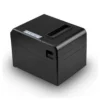
Reviews
There are no reviews yet.