
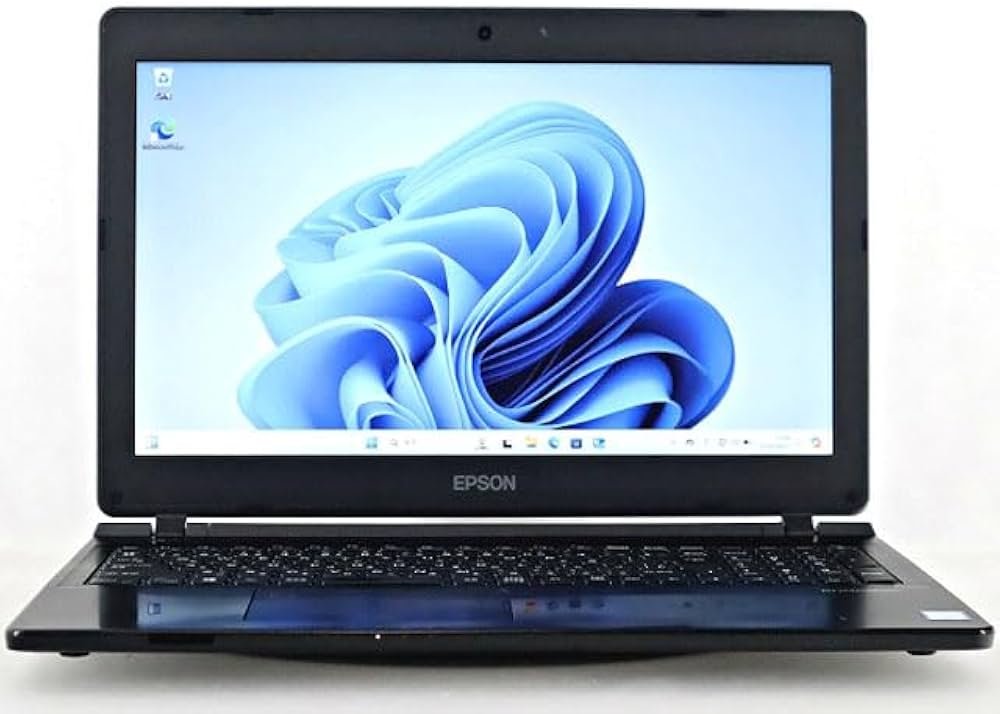
Epson Endeavor NJ4300E — 15.6-Inch Business Laptop with Intel Core i3
The Epson Endeavor NJ4300E is a standard-duty business laptop designed for task-focused professional environments. Built around an Intel Core i3 processor, 8GB of RAM, and a 500GB hard disk drive, the NJ4300E addresses everyday computing requirements without unnecessary complexity. Its 15.6-inch display provides a full-size working surface suited to office-based roles where screen space and keyboard comfort take priority over portability.
The Endeavor NJ4300E is positioned within Epson’s Japan-market business computing line, targeting corporate procurement environments that prioritise reliability, manageability, and cost-efficiency over high-end specification.
Processor and Performance
The Epson Endeavor NJ4300E is powered by an Intel Core i3 processor. The Core i3 delivers dual-core processing with Hyper-Threading support, providing four logical threads for concurrent task handling. As a result, the NJ4300E manages standard office workloads — including document editing, spreadsheet work, email, browser-based applications, and video conferencing — within its thermal and power envelope.
Intel UHD Graphics are integrated into the processor, supporting standard display output and media playback. The NJ4300E is not configured for graphics-intensive tasks such as 3D rendering or CAD, but consequently performs reliably within its intended office productivity scope. For organisations deploying the Endeavor NJ4300E at scale, the Core i3 platform reduces per-unit power consumption, contributing to lower operational costs across a managed fleet.
Memory
The Endeavor NJ4300E is equipped with 8GB of DDR4 RAM. This capacity supports single-user multitasking across the core business application stack — office productivity software, a moderate number of browser tabs, and background communication tools running simultaneously. Furthermore, 8GB meets the baseline memory requirement for Windows 10 Pro and Windows 11 Pro under standard corporate deployment configurations.
For roles involving heavier concurrent application use, memory upgrade options may be available depending on the platform’s SO-DIMM slot configuration. Users with more demanding workloads should verify upgrade compatibility at the point of procurement.
Storage
The NJ4300E includes a 500GB hard disk drive for local storage. This volume comfortably accommodates operating system files, a full business application suite, and substantial user document and media libraries. Additionally, the 500GB capacity provides room for local backups and offline data archives in environments where network storage access is intermittent.
As with all HDD-based configurations, boot times and random file-access speeds are slower than SSD alternatives. Organisations with performance-sensitive workflows or high-frequency application launching may benefit from evaluating SSD upgrade options where available.
Display
The Epson Endeavor NJ4300E features a 15.6-inch display, the largest screen size in the standard business laptop category. At Full HD (1920 × 1080) resolution, the panel renders text and interface elements clearly across productivity and communication applications. The larger display area supports side-by-side document viewing, extended spreadsheet navigation, and video call layouts without requiring an external monitor in many office scenarios.
The 15.6-inch form factor also aligns with a full-size keyboard layout, including a numeric keypad on select configurations — a practical feature for roles involving frequent numerical data entry.
Build and Design
The Endeavor NJ4300E follows Epson’s business-oriented design language, emphasising functional reliability over consumer aesthetics. The chassis is built for desk-based daily use within corporate environments. While the NJ4300E is not marketed as an ultra-portable device, its construction addresses standard durability expectations for office-deployed hardware.
The 15.6-inch form factor results in a device weight and footprint suited primarily to fixed desk use or short-distance transport between office locations. The keyboard layout accommodates full-time typing workloads, and the display hinge is designed for repeated open-and-close cycles over a standard device lifecycle.
Connectivity and Ports
The Epson Endeavor NJ4300E provides a practical port selection for office and peripheral connectivity:
- USB-A (3.0 / 3.1) — connects storage devices, input peripherals, and legacy accessories
- USB-C — supports data transfer and charging on compatible devices
- HDMI — enables connection to external monitors, projectors, and display adapters
- SD card reader — facilitates media transfer from cameras and compatible devices
- 3.5mm audio combo jack — connects headsets for communication and audio monitoring
- RJ-45 Ethernet — provides wired network connectivity for stable, low-latency office network access
- Kensington lock slot — physical security anchor for shared desk environments
Wireless connectivity includes Wi-Fi 5 (802.11ac) and Bluetooth. The inclusion of a wired Ethernet port is particularly relevant for corporate environments where wired network infrastructure is standard and preferred for reliability and security policy compliance.
Security Features
The NJ4300E includes foundational security features aligned with standard business deployment requirements:
- TPM 2.0 — hardware-based encryption for data protection and secure boot processes
- BIOS password support — restricts unauthorised hardware-level access
- Windows Hello compatibility — supports PIN and biometric login depending on configuration
- Kensington lock slot — physical restraint for shared office and open-plan environments
These features support standard corporate IT security policies without requiring additional hardware security modules for typical business deployments.
Battery and Power
The Endeavor NJ4300E is designed primarily for desk-based use, with battery capacity sized accordingly. Estimated battery runtime under mixed office use is approximately 6–8 hours, sufficient for in-office workdays with periodic access to power. The Core i3 processor’s efficient power draw contributes to stable battery performance under light-to-moderate workloads.
The device charges via its dedicated power adapter. For primarily desk-based deployments, battery runtime is less critical than for travel-focused configurations.
Ideal Users
The Epson Endeavor NJ4300E is well-suited for the following professional profiles:
- Office-based administrative staff — The Core i3 processor and 8GB RAM handle document processing, email management, and browser-based business applications without performance issues. The 15.6-inch display and full-size keyboard reduce eye strain and typing fatigue during full working days at a desk.
- Corporate fleet deployments in cost-sensitive environments — The NJ4300E’s modest specification tier keeps per-unit acquisition costs controlled for large-scale procurement. The Core i3 platform’s low power draw additionally reduces ongoing energy costs in multi-device office deployments.
- Data entry and records management roles — The 15.6-inch display provides clear visibility of forms, databases, and spreadsheets. Select configurations include a numeric keypad, directly supporting high-frequency numerical input workflows. The 500GB HDD offers local storage for document archives without reliance on constant network access.
- Reception and front-desk operations — The full-size display supports customer-facing information retrieval, scheduling software, and communication tools. The wired Ethernet port ensures reliable network connectivity in fixed-desk reception environments where Wi-Fi stability may be inconsistent.
- Education and training environments — The NJ4300E’s straightforward specification suits e-learning platforms, training management systems, and document-based coursework. The 500GB storage provides space for locally cached training materials and offline content libraries.
Technical Specifications
Processor
| Attribute | Detail |
|---|---|
| Processor Family | Intel Core i3 |
| Architecture | Dual-core with Hyper-Threading (4 logical threads) |
| Graphics | Intel UHD Integrated Graphics |
Memory
| Attribute | Detail |
|---|---|
| Installed RAM | 8GB |
| Memory Type | DDR4 |
| Slot Configuration | SO-DIMM (upgrade subject to platform support) |
Storage
| Attribute | Detail |
|---|---|
| Storage Capacity | 500GB |
| Storage Type | HDD |
| Form Factor | 2.5-inch SATA |
Display
| Attribute | Detail |
|---|---|
| Screen Size | 15.6 inches |
| Resolution | 1920 × 1080 (Full HD) |
| Aspect Ratio | 16:9 |
| Touch | No |
| Panel Coating | Anti-glare |
Ports and Connectivity
| Attribute | Detail |
|---|---|
| USB-A | Multiple USB 3.0 / 3.1 ports |
| USB-C | Yes |
| HDMI | Yes |
| SD Card Reader | Yes |
| Audio | 3.5mm combo jack |
| Ethernet | RJ-45 Gigabit LAN |
| Wi-Fi | Wi-Fi 5 (802.11ac) |
| Bluetooth | Yes |
Security
| Attribute | Detail |
|---|---|
| TPM | TPM 2.0 |
| BIOS Security | BIOS password support |
| Windows Hello | Compatible (configuration-dependent) |
| Physical Lock | Kensington lock slot |
Power and Battery
| Attribute | Detail |
|---|---|
| Estimated Battery Life | Approximately 6–8 hours (mixed office use) |
| Charging Interface | AC power adapter |
Build and Compliance
| Attribute | Detail |
|---|---|
| Form Factor | Clamshell laptop |
| Screen Size Class | 15.6-inch full-size |
| Numeric Keypad | Available on select configurations |
| Operating System | Windows 10 Pro / Windows 11 Pro |
| Market | Japan domestic business market (Epson Direct) |
| Weight | Approximately 2.1 kg (configuration-dependent) |
 No products in the cart.
Reviews
There are no reviews yet.