Lenovo ThinkPad E16 Gen 3 + 15.6″ Toploader Bag — The Most Powerful ThinkPad E16 Ever Made, Now with On-Device AI (21SR0063UE)
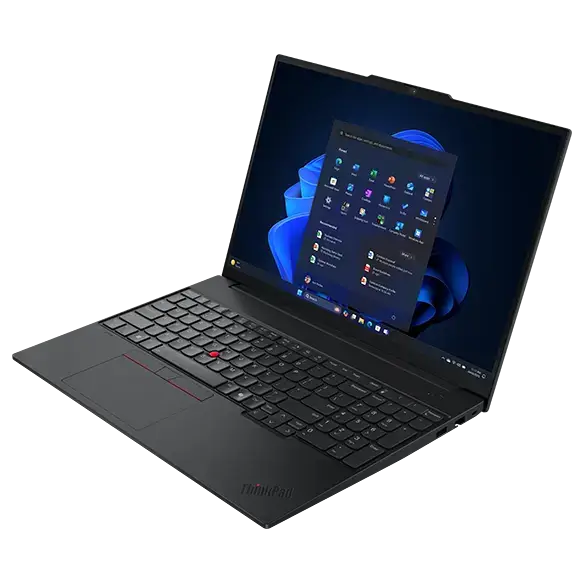
There are three generations of the ThinkPad E16. This is the one you want. The Lenovo ThinkPad E16 Gen 3 represents the full maturation of Lenovo’s boldest E-series decision — the move to a 16-inch professional canvas — now supercharged with Intel’s Core Ultra 7 255H processor, a class-leading 16GB of DDR5 memory, a dedicated AI Neural Processing Unit, and the full might of the ThinkPad’s legendary engineering DNA. Bundled with a 15.6-inch toploader carry bag, this is not simply a laptop purchase. This is a declaration that you are done compromising between power, intelligence, screen size, and portability — and that you are ready for a machine that is unambiguously in a different league.
Why the Gen 3 Changes Everything About the ThinkPad E16
The original ThinkPad E16 Gen 1 proved a concept: professionals want a large-screen ThinkPad at a practical price point. The Gen 2 refined it. The Gen 3 elevates it entirely — replacing conventional Intel Core processors with the revolutionary Intel Core Ultra 7 255H from the Meteor Lake architecture. This is not a generational spec bump. It is a platform transformation. The addition of a dedicated AI engine, a dramatically improved GPU architecture, and DDR5 memory across a 16-core hybrid CPU represents a leap in capability that redefines what a professional laptop in this class can do.
For any buyer searching “best ThinkPad E16 to buy in 2025”, “ThinkPad E16 Gen 3 review”, or “16-inch business laptop with AI NPU” — the Gen 3 is the definitive answer to all three queries.
Intel Core Ultra 7 255H — The H-Series Powerhouse That Means Business
Not all Core Ultra processors are created equal. The Core Ultra 7 255H carries the H-series designation — and that single letter is enormously significant. Where U-class chips prioritise efficiency above all else, H-class processors are engineered for sustained, high-performance output under extended professional workloads. This is the chip category favoured by content creators, data scientists, software engineers, and power users — now available in a ThinkPad E16 form factor.
16 Cores, 22 Threads — Raw Multitasking Muscle
The Core Ultra 7 255H delivers a 16-core, 22-thread hybrid architecture combining:
- 6 Performance cores (P-cores) clocked aggressively for demanding single and multi-threaded workloads — video encoding, 3D rendering, complex simulation, large database queries
- 8 Efficiency cores (E-cores) handling background operations, communication tools, cloud sync, and system tasks without drawing on the P-core power budget
- 2 Low Power Efficiency cores (LP E-cores) for ultra-light tasks during idle and standby states, preserving battery when the machine is not under load
Intel’s Thread Director technology orchestrates this architecture automatically — routing each computational task to the optimal core type in real time, without user configuration. The result is a machine that feels responsive and decisive whether you are running a single document or twenty simultaneous applications.
Boost Clocks Up to 4.8GHz — Maximum Performance When Stakes Are Highest
When deadlines compress and workloads peak, the Core Ultra 7 255H boosts to 4.8GHz — delivering the burst performance needed to power through intensive renders, complex calculations, large data transformations, and multi-application workflows in the shortest possible time. This is not a processor that makes you wait. It is a processor that makes waiting irrelevant.
The Dedicated Intel NPU — On-Device AI That Redefines Professional Productivity
This is the capability that separates the ThinkPad E16 Gen 3 from every previous generation: the dedicated Neural Processing Unit (NPU) embedded within the Core Ultra 7 255H. This hardware AI accelerator processes machine learning workloads independently from the CPU and GPU — meaning AI tasks run faster, consume less power, and do not compete with your core computing resources.
What the NPU Does for You, Every Single Day
The NPU is not a theoretical feature for future applications. It delivers measurable, practical advantages in tools professionals use today:
- Microsoft Copilot — Windows 11’s AI assistant runs hardware-accelerated on the NPU, providing faster document drafting, email summarisation, data analysis, and intelligent search without taxing the CPU or draining the battery
- Real-time video intelligence — background blur, face framing, eye contact correction, and AI noise suppression in Teams, Zoom, Google Meet, and Webex all execute locally on the NPU with zero latency and zero cloud dependency
- AI-enhanced creativity tools — Adobe Firefly, Photoshop’s Generative Fill, and Premiere’s AI editing features leverage the NPU for faster local processing
- Intelligent power management — the NPU analyses usage patterns and adjusts performance profiles predictively, extending battery life without requiring manual mode switching
- Local LLM inference — for professionals exploring on-device AI models, the NPU enables private, cloud-free AI processing of sensitive business data
For organisations asking “does the ThinkPad E16 Gen 3 support Microsoft Copilot+ PC features?” — yes, with hardware NPU acceleration delivering the performance tier that software-only AI implementations cannot match.
16GB DDR5 — The Memory Configuration That Removes Every Bottleneck
This is the specification that the discerning professional buyer notices immediately — and appreciates every single day. 16GB of DDR5 RAM is the configuration that eliminates the cognitive anxiety of wondering whether your laptop can handle what you are about to throw at it.
Why 16GB DDR5 Is the Right Choice for Serious Professionals
With 8GB configurations becoming the minimum viable option for modern Windows 11 environments, 16GB DDR5 provides the headroom that transforms a capable machine into an effortless one:
- Run Microsoft Teams, Outlook, Excel, Word, and a 30-tab Chrome session simultaneously — all without memory pressure, page file thrashing, or the slowdowns that plague 8GB systems in identical scenarios
- Open large financial models with thousands of rows and complex formulas without wait states or recalculation delays
- Run multiple development environments, Docker containers, and local servers simultaneously — the configuration that developers and IT architects specifically look for
- Handle video editing timelines with multiple tracks in DaVinci Resolve, Premiere Pro, or Final Cut without rendering delays from RAM limitations
- Support virtual machine workloads — running a Windows sandbox, a Linux development environment, or testing virtual instances alongside primary applications
DDR5’s bandwidth advantage over DDR4 compounds the benefit further — not just more memory capacity, but faster access to all of it. The practical experience is a machine that never feels like it is struggling.
Intel Arc Graphics — A GPU Upgrade That Matters for Visual Workloads
The Core Ultra 7 255H integrates Intel Arc integrated graphics — a significant architectural departure from the Iris Xe GPU of previous generation ThinkPads. Intel Arc delivers:
- Hardware-accelerated ray tracing — relevant for architects, product designers, and 3D visualisation professionals working with rendered outputs
- AV1 hardware encode and decode — the modern video codec used by YouTube, Netflix, and video conferencing platforms, handled at the hardware level for smooth playback and efficient video production
- XeSS AI super-sampling — Intel’s AI-powered resolution upscaling for smoother visuals in compatible applications and light gaming scenarios
- Support for up to four simultaneous external displays via Thunderbolt 4 and HDMI — a genuine multi-monitor workstation capability without a discrete GPU
For professionals who considered this machine only for productivity and then discover what the Arc GPU can handle visually — the capability is a welcome and substantial surprise.
16-Inch WUXGA IPS Display — The Professional Canvas You Will Not Want to Leave
The 16-inch WUXGA IPS display of the ThinkPad E16 Gen 3 is the platform upon which everything else is expressed. Hours of work happen here — and Lenovo has configured this panel to make those hours as productive and comfortable as possible.
The 16:10 Workspace Advantage — Measurably More Room to Work
At 1920×1200 pixels across a 16:10 aspect ratio, this display provides more vertical content space than any 16:9 panel of equivalent diagonal size. The practical impact across professional scenarios:
- Document review — more lines of a contract, report, or research paper visible at once, reducing scroll frequency by a meaningful margin across a full working day
- Spreadsheet and data analysis — more rows visible in Excel, Power BI, Tableau, and financial platforms, keeping more data in view without constant navigation
- Development environments — more lines of code visible simultaneously in VS Code, IntelliJ, or PyCharm — a productivity advantage that developers consistently identify as significant
- Presentation design — more slide canvas visible in PowerPoint and Keynote, enabling broader compositional decisions without constant zoom adjustment
- Dual-pane workflows — side-by-side application layouts that are genuinely usable rather than cramped, making split-screen working a comfortable default rather than a compromise
IPS Quality Certified for Professional Use
- Wide colour gamut with accurate colour reproduction — content created on this display looks as intended on external monitors, projectors, and printed output
- IPS anti-glare panel minimises reflections across varied lighting environments — from glass-walled conference rooms to outdoor café sessions
- Wide viewing angles — colleagues viewing your shared screen from off-axis positions see accurate, undistorted colour and contrast
- Low blue-light mode for sustained working sessions — a feature that pays cumulative dividends for professionals spending six to ten hours daily at their screen
ThinkPad Keyboard with Numpad — The Typing Experience That Built a Loyal Following
Across thirty years and millions of units sold, the ThinkPad keyboard has been the hardware feature most consistently cited by professionals as the reason they return to the brand. The ThinkPad E16 Gen 3 honours that legacy:
- Full-size keyboard layout with integrated numpad — a dedicated numerical input section that accountants, financial analysts, data professionals, and engineers consider non-negotiable
- 1.5mm key travel — the depth that delivers tactile, confident feedback, reducing typing errors and fatigue across long working sessions
- Spill-resistant design with drainage channels — directing accidental liquid away from critical internal components, protecting your machine from the occupational hazard of working near beverages
- White LED backlight for comfortable, even illumination in low-light environments — evening work sessions, early morning flights, and dimly lit conference rooms
- TrackPoint pointing stick — the red isometric pointing device at the centre of the keyboard that allows precise cursor control without lifting hands from the home row, beloved by ThinkPad loyalists and immediately missed when absent
MIL-SPEC 810H Durability — Tested to Survive Where You Actually Work
The ThinkPad E16 Gen 3 carries MIL-STD-810H military-grade durability certification — twelve discrete test protocols that validate real-world resilience far beyond standard consumer durability claims:
- Resistance to drops and mechanical shock from standard working heights
- Operation across extreme temperature ranges — cold vehicle interiors to hot outdoor environments
- Vibration tolerance for transit by road, rail, and air — protecting internal components including the SSD and display assembly
- Humidity and moisture resistance relevant to tropical and coastal operating environments
- Dust and particulate resistance for field and industrial adjacent settings
This certification is not marketing language. It is a documented engineering standard that enterprise procurement teams, government IT departments, and informed professional buyers specifically require. The ThinkPad E16 Gen 3 meets it.
Enterprise Security — Comprehensive, Hardware-Rooted, Always On
A Security Architecture That Protects What Cannot Be Replaced
- TPM 2.0 (Trusted Platform Module) — hardware-based encryption for system credentials, BitLocker keys, and sensitive data stores, providing a security foundation that no software solution can replicate or circumvent
- Fingerprint reader integrated into the power button — instant Windows Hello biometric authentication the moment you press power, eliminating password entry latency and the vulnerability of static credentials
- IR camera with Windows Hello facial recognition — hands-free login by facial recognition that works reliably across varied lighting conditions, secured against photo spoofing attacks
- Physical webcam privacy shutter — a mechanical cover providing absolute assurance that the camera is inactive when closed, independent of any software or driver state
- Kensington lock slot for physical cable-lock security in shared environments — offices, conference rooms, co-working spaces, and academic settings
- Self-encrypting drive (SED) support for organisations requiring full-disk hardware encryption independently of the operating system
- Full compatibility with enterprise MDM frameworks, remote provisioning tools, Intel vPro management features, and corporate IT security policies
Connectivity — Every Interface a Professional Demands
The ThinkPad E16 Gen 3 is engineered for the connected professional who works across multiple devices, displays, and network environments without tolerance for missing ports or adapter dependency:
- Thunderbolt 4 (USB-C) — the universal professional connector supporting data transfer at 40Gbps, 4K/8K display output, and 100W power delivery simultaneously through a single cable
- USB-A 3.2 Gen 1 ×2 — full-size ports for the existing ecosystem of USB peripherals, storage devices, and accessories without adapters
- HDMI 2.1 — direct, full-resolution connection to projectors, external monitors, and conference room AV systems
- SD card reader — direct media import for photographers, videographers, field researchers, and content creators
- RJ-45 Gigabit Ethernet — wired network access for stable, high-bandwidth connectivity when wireless is unavailable, restricted, or inadequate — a port absent from many competing thin-and-light designs that the ThinkPad E16 retains as a professional necessity
- Wi-Fi 6E tri-band wireless — the latest Wi-Fi standard delivering faster speeds, lower latency, and greater reliability in congested network environments including airports, hotels, and dense office deployments
- Bluetooth 5.3 — the current wireless standard for peripheral pairing with extended range, higher data throughput, and improved connection stability
- 3.5mm audio combo jack — direct headset, microphone, and speaker connectivity without a USB or Bluetooth intermediary
The 15.6-Inch Toploader Bag — Completing a Machine at This Level Deserves a Carry System at This Level
A laptop with these specifications demands a carry solution worthy of its value. The 15.6-inch toploader bag included in this bundle provides that protection with a design philosophy that mirrors the ThinkPad’s own: practical, professional, and built around how people actually work.
Toploader Access — Why Professionals Choose This Format
The vertical top-access design fundamentally changes the experience of travelling with a laptop. At airport security, you extract the machine in one smooth upward motion without unpacking cables or accessories. At the office, you have your laptop in hand before you have taken your coat off. In a client meeting, the retrieval is quiet, immediate, and unhurried. These micro-interactions accumulate into a meaningfully less stressful working life.
Bag Specifications Built for Daily Professional Use
- Dedicated padded laptop compartment with structural reinforcement — protecting the ThinkPad E16’s chassis and 16-inch display from compression, impact, and pressure during transit
- Sized for up to 15.6-inch laptops — accommodating the ThinkPad E16 Gen 3’s physical dimensions with compatibility confirmed for this form factor
- Multiple organisation sections — dedicated compartments for the power adapter, USB cables, peripherals, notebooks, pens, documents, and personal items, keeping the bag navigable and efficient
- Water-resistant outer fabric — essential protection for urban commuters navigating unpredictable weather, and for professionals working in field environments
- Padded shoulder strap with anti-slip material — comfortable load distribution for extended carry, reducing shoulder fatigue across long commutes
- Reinforced grab handle — a secondary carry option for short-distance transit and hand-offs
- Professional aesthetic in a neutral, understated design appropriate for executive, institutional, and field contexts alike
Who Is the ThinkPad E16 Gen 3 Bundle the Right Choice For?
This is the configuration for professionals who have moved beyond the question of whether their laptop can handle the work — and are focused entirely on how much faster and more intelligently it can help them do it. Specifically:
- Senior finance and strategy professionals running complex financial models, scenario analysis, and data-heavy reporting tools who need 16GB RAM and a large display to work at full capacity
- Software engineers and full-stack developers who run local development environments, containers, virtual machines, and build pipelines simultaneously — and need 16 cores and 16GB RAM to do it without compromise
- Data analysts and business intelligence professionals working across Power BI, Tableau, Python notebooks, and large dataset queries who benefit from the H-series processor’s sustained throughput
- Creative professionals and video producers working in DaVinci Resolve, Adobe Premiere, After Effects, or Lightroom who need the Arc GPU’s hardware acceleration and the Core Ultra 7’s rendering performance
- Legal, compliance, and consulting professionals handling sensitive data who require the full ThinkPad security stack — TPM 2.0, facial recognition, privacy shutter, and Kensington lock — as non-negotiable requirements
- IT architects and systems administrators who spec machines precisely and choose the ThinkPad E16 Gen 3 because they understand exactly what the Core Ultra 7 H-series platform and 16GB DDR5 represent
- Enterprises and SMEs deploying workstations for high-value roles where the cost of an underpowered machine — in lost productivity, frustration, and premature replacement — exceeds the investment in getting it right from day one
The ThinkPad E16 Gen 3 vs. the Competition — Where It Wins Every Conversation
| Specification | ThinkPad E16 Gen 3 | Typical Competitor |
|---|---|---|
| Processor tier | Core Ultra 7 H-series (16 cores) | Core i5/i7 U-series |
| Memory | 16GB DDR5 | 8GB DDR4/DDR5 |
| AI acceleration | Dedicated NPU hardware | Software-only |
| Display | 16″ WUXGA 16:10 IPS | 16″ FHD 16:9 |
| GPU | Intel Arc (hardware ray trace) | Intel Iris Xe |
| Durability | MIL-STD-810H certified | Self-certified |
| Ethernet | RJ-45 included | Often omitted |
| Carry solution | Toploader bag included | Sold separately |
| Heritage | 30+ years ThinkPad legacy | Variable |
The Final Word — Maximum ThinkPad, Maximum Readiness, From Day One
The Lenovo ThinkPad E16 Gen 3 bundle (21SR0063UE) is the answer to the professional who has done the research, compared the alternatives, and arrived at the same conclusion that enterprise IT departments, technology reviewers, and experienced professionals have reached for three decades: when you need a laptop that performs without compromise, carries without anxiety, and lasts without disappointment — you buy a ThinkPad.
The Gen 3 adds what no previous ThinkPad E-series offered: genuine AI intelligence, H-series performance headroom, DDR5 memory at the configuration level that removes every constraint, and Intel Arc graphics that open visual workload possibilities beyond traditional integrated GPU limitations.
The toploader bag ensures that from the moment this bundle arrives, you are not just equipped — you are fully, completely, professionally ready.
Order the Lenovo ThinkPad E16 Gen 3 bundle today. Because when the work is serious, the machine needs to be too.

 No products in the cart.
Reviews
There are no reviews yet.