
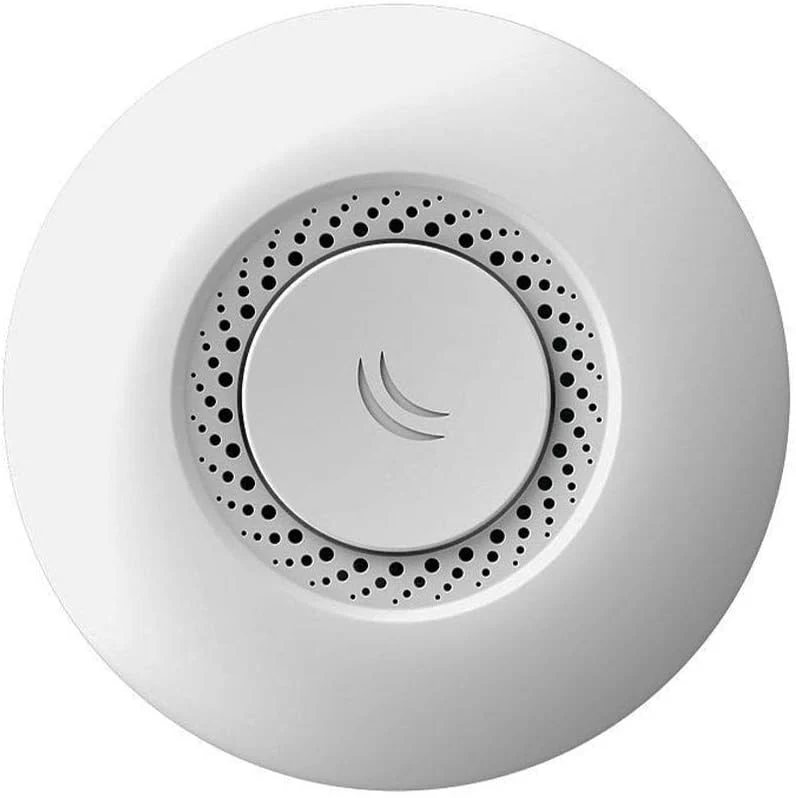
MikroTik RouterBOARD cAP-2nD — Indoor Ceiling Access Point | 2.4GHz 802.11b/g/n
SKU: RBcAP-2nD | Brand: MikroTik | Series: cAP (Ceiling Access Point) | OS: RouterOS v7
What Is the MikroTik cAP-2nD? Seamless Wi-Fi From Above — Where It Belongs
Walk into any professionally designed office, hotel lobby, hospital corridor, school classroom, or retail space, and look up. Chances are, the wireless access points aren’t sitting on desks or bolted awkwardly to walls — they’re mounted flush to the ceiling, delivering consistent, omnidirectional coverage across the entire room without dead zones, without unsightly cable runs, and without the chaotic signal interference of consumer-grade equipment.
That is precisely the deployment philosophy behind the MikroTik RouterBOARD cAP-2nD — a purpose-built indoor ceiling access point engineered to deliver clean, centrally distributed 2.4GHz 802.11b/g/n wireless coverage to every corner of a room, managed through the full power of RouterOS with zero compromise on control, visibility, or scalability.
Compact, discreet, and elegantly circular, the cAP-2nD mounts directly to a standard electrical back box or ceiling surface. A single PoE cable handles both power and data. RouterOS handles everything else — from VLAN-tagged traffic and hotspot captive portals to CAPsMAN-managed enterprise rollouts across dozens of access points under a single controller.
If you’re building a wireless network that needs to look professional, perform reliably, and scale without complexity, the MikroTik cAP-2nD is where you start.
Key Features & Technical Specifications
Core Hardware at a Glance
- CPU: QCA9533 @ 650MHz — single-core, purpose-optimized for wireless forwarding
- RAM: 64MB DDR2 — ample for routing, bridging, and CAPsMAN operation
- Flash Storage: 16MB — stores RouterOS firmware and full configuration
- Wireless Standard: IEEE 802.11b/g/n — 2.4GHz band
- MIMO Configuration: 2×2 MIMO with 2 internal chain antennas
- Antenna Gain: 2 x 1.5 dBi internal omnidirectional antennas
- Max Wireless Speed: 300Mbps (N300) at 2.4GHz
- Ethernet Port: 1 x 10/100 Mbps RJ45 (PoE-in capable)
- PoE Input: 802.3af/at standard PoE and passive PoE (9–30V)
- Operating System: RouterOS v7 (License Level 4)
- Operating Temperature: -40°C to +70°C
- Dimensions: 143mm diameter × 23mm height
- Weight: 110g
- Mounting: Ceiling-mount — standard electrical back box compatible
- Power Consumption: ~4.5W typical
Wireless Specifications
- Frequency Band: 2.4GHz (2412–2484MHz)
- Supported Protocols: 802.11b (11Mbps), 802.11g (54Mbps), 802.11n (up to 300Mbps)
- Channel Width: 20MHz / 40MHz selectable
- TX Power: Up to 22dBm (country-dependent)
- Supported Security: WPA, WPA2, WPA3 (with RouterOS v7), WEP, open
- Multiple SSIDs: Up to 128 virtual interfaces — serve multiple SSIDs per AP simultaneously
- Band Steering: Via CAPsMAN configuration
- CAPsMAN Support: Full CAPsMAN v2 compatibility — centrally managed AP deployment
Ceiling Mounting — The Engineering Decision That Changes Everything
Why Overhead Placement Outperforms Wall & Desk Mounting
Most wireless problems aren’t caused by bad hardware — they’re caused by bad placement. A powerful router sitting on a desk or mounted low on a wall fires half its signal into furniture, floors, and walls. The result is uneven coverage: strong signal near the device, weak signal at the far corner of the room, and dead zones that no amount of boosting can fix.
The cAP-2nD solves this at the hardware design level:
- Central ceiling placement positions the AP at the geometric center of the coverage area — the single location that minimizes the maximum distance to any client device
- Omnidirectional antennas radiate signal in a 360-degree horizontal pattern — every client in the room receives equal signal strength
- Downward-firing radiation pattern focuses energy where users actually are, rather than broadcasting into the floor above or the ceiling void
- Zero physical obstruction at ceiling height — signal travels directly to client devices without passing through desks, partitions, shelving units, or human bodies
- Clean installation aesthetic — the circular white housing blends naturally with ceiling tiles, recessed lighting, and smoke detectors; guests and staff rarely notice it is there
For environments where coverage uniformity matters — hotel rooms, open-plan offices, classrooms, clinics, warehouses — ceiling placement with the cAP-2nD is not a preference. It is the correct engineering decision.
CAPsMAN — Manage One Access Point or One Hundred With Equal Ease
Centralized Wireless Management That Scales Without Limits
One of the most compelling advantages of the MikroTik cAP-2nD over competing ceiling APs is its native integration with CAPsMAN v2 (Controlled Access Point System Manager) — MikroTik’s centralized wireless management system built directly into RouterOS.
With CAPsMAN, every access point in your deployment operates as a Controlled AP (CAP) — a managed radio that receives its entire configuration (SSIDs, security, VLANs, channels, power levels, roaming settings) from a central RouterOS controller. The implications are transformative:
- Single-pane management: Change the Wi-Fi password once on the controller — it propagates instantly to every AP in the network, simultaneously
- Seamless roaming: Clients moving between rooms or floors maintain their session without drops, reconnections, or authentication delays
- Consistent RF policy: All APs enforce the same channel plan, transmit power, and band steering rules — no rogue configurations
- SSID-to-VLAN mapping: Each SSID can be mapped to a separate VLAN — guest traffic, staff traffic, IoT devices, and management all stay isolated end-to-end
- Centralized traffic forwarding: Client traffic can be tunneled back to the controller for central policy enforcement, or forwarded locally for performance
- Zero-touch AP deployment: New cAP-2nD units discover the CAPsMAN controller automatically via broadcast or preconfigured address — no per-AP configuration needed
- Live monitoring: Per-AP client counts, signal levels, data rates, error counts, and channel utilization visible from a single dashboard
For any deployment with more than two access points, CAPsMAN transforms management from a per-device burden into a fleet-wide operation — and the cAP-2nD is designed from the ground up to participate in it.
RouterOS on the cAP-2nD — More Than Just an Access Point
A Fully Capable Network Node in a Ceiling Housing
Most access points run closed, feature-limited firmware that leaves you guessing what’s happening on your wireless network. The cAP-2nD runs full RouterOS v7 with License Level 4 — which means every capability available to MikroTik’s most advanced routers is available here, in your ceiling:
- Hotspot Gateway: Deploy a captive portal login page for guest Wi-Fi — collect user credentials, enforce session time limits, set bandwidth quotas, redirect first-time visitors to a splash page
- DHCP Server: Run a local DHCP server directly on the AP — useful for standalone or remote site deployments without a central router
- Firewall Rules: Apply per-wireless-interface firewall policies — block inter-client communication, restrict access to management addresses, rate-limit specific protocols
- Bridge with VLAN filtering: Tag wireless traffic into VLANs before it hits the uplink — essential for multi-tenant or segmented network architectures
- Bandwidth limiting: Apply per-client or per-SSID queues to enforce fair-use policies
- SNMP & Netflow: Feed wireless performance data into monitoring platforms (Zabbix, PRTG, LibreNMS) for full observability
- Scripting & Scheduler: Automate tasks — schedule SSID broadcast windows, alert on client threshold events, rotate Wi-Fi passwords on a timer
- WPA3 support in RouterOS v7 — modern, forward-looking wireless security for sensitive environments
Who Is the MikroTik cAP-2nD Built For?
Any Environment Where Wireless Performance and Aesthetics Both Matter
- Hotels & Hospitality: Per-room or corridor ceiling APs with hotspot captive portal, bandwidth quotas per guest, VLAN isolation between rooms — all centrally managed via CAPsMAN across the property
- Offices & Co-Working Spaces: Uniform coverage for open-plan floors, SSID-to-VLAN mapping for staff vs guest Wi-Fi, seamless roaming for laptop and mobile users between meeting rooms
- Schools & Universities: Classroom-by-classroom AP deployment under CAPsMAN control, content filtering via Layer 7 rules, hotspot login for student authentication, bandwidth throttling for BYOD devices
- Healthcare Facilities: Clean ceiling installation that meets infection-control requirements, VLAN isolation for medical device networks, reliable roaming for staff using VoIP handsets and mobile terminals
- Retail Stores & Restaurants: Customer-facing captive portal with branded splash page, staff SSID on isolated VLAN, easy management without on-site IT staff via remote Winbox/WebFig access
- Small Businesses & SMEs: Professional wireless coverage without the complexity and cost of enterprise brands — CAPsMAN scales from 1 to 100 APs on the same platform
- ISPs & WISPs: Deploy as a customer-premises indoor AP, centrally provisioned and managed via CAPsMAN on the ISP’s RouterOS controller
- Home Lab & Power Users: Full RouterOS control over every wireless parameter — transmit power, channel width, beacon intervals, client isolation, and more
802.3af/at PoE — Power and Data in One Clean Cable
The Installation That Takes Minutes, Not Hours
The cAP-2nD’s support for industry-standard 802.3af/at Power over Ethernet means installation is remarkably straightforward:
- Run a single Cat5e or Cat6 Ethernet cable from your PoE switch or injector to the AP location in the ceiling
- The cable delivers both network connectivity and electrical power — no separate power outlet required in the ceiling void
- No electrician needed — in most jurisdictions, low-voltage data cabling to a PoE device does not require a licensed electrical contractor
- Compatible with any 802.3af/at compliant PoE switch — including MikroTik’s own CRS and CSS series switches — for a fully unified infrastructure
- Also accepts passive PoE (9–30V) for compatibility with non-standard PoE injectors and MikroTik passive PoE outputs (including Port 5 of the RB760iGS hEX S)
- Mounts directly to a standard 60mm European or UK electrical back box — the same round boxes used for light switches and ceiling roses
This single-cable installation model dramatically reduces deployment time, eliminates cable clutter, and makes the cAP-2nD suitable for retrofitting into existing buildings where new power runs would be disruptive and costly.
2.4GHz — The Band That Reaches Everywhere
Why 2.4GHz Still Wins in Real-World Building Deployments
In a world increasingly focused on 5GHz and Wi-Fi 6, the 2.4GHz band often gets dismissed — unfairly. For many real-world deployment scenarios, 2.4GHz remains the superior choice:
- Superior range and wall penetration: 2.4GHz signals travel further and pass through concrete, brick, and plasterboard walls far more effectively than 5GHz — critical in buildings with thick partitions, older construction, or multiple rooms served by a single AP
- Universal device compatibility: Every Wi-Fi device ever manufactured — including legacy printers, IoT sensors, security cameras, smart home devices, barcode scanners, and handheld terminals — supports 2.4GHz. Zero compatibility concerns
- Lower noise floor in building interiors: 5GHz attenuates sharply with distance — in environments where clients are 10–20 metres from the AP (common in hotel corridors, classrooms, warehouses), 2.4GHz maintains reliable connection speeds where 5GHz would drop clients
- Ideal for IoT and low-bandwidth devices: Smart sensors, POS terminals, environmental monitors, and access control systems don’t need gigabit throughput — they need reliable connectivity, and 2.4GHz delivers it consistently
- Controlled interference management: RouterOS gives you full control over channel selection (1, 6, 11 for non-overlapping coverage), transmit power, and SSID count — so you can plan a clean 2.4GHz deployment that avoids interference from neighboring networks
For dense indoor deployments with a mix of modern and legacy devices, IoT equipment, and users spread across large rooms or corridors, the cAP-2nD’s 2.4GHz coverage is the right tool — not a limitation.
Management — Winbox, WebFig, CAPsMAN, SSH, and API
Access the Way Your Team Prefers
- Winbox: MikroTik’s native Windows GUI — discover and connect to cAP-2nD units by MAC address without knowing their IP; full visual management of all RouterOS features
- WebFig: Browser-based management from any OS — Chrome, Firefox, Safari — no software installation
- CAPsMAN Controller: Manage all cAP-2nD units from a central RouterOS device — the preferred method for multi-AP deployments
- SSH CLI: Full command-line access for scripting, bulk configuration, and advanced troubleshooting
- RouterOS API: Programmatic management for integration with network automation platforms, Python scripts, Ansible playbooks
- SNMP (v1, v2c, v3): Feed performance metrics into Zabbix, PRTG, LibreNMS, or any SNMP-capable NMS
- The Dude: MikroTik’s free network monitoring platform auto-discovers and maps all cAP-2nD units in your network topology
Frequently Asked Questions
Does the cAP-2nD support 5GHz or dual-band operation?
No — the cAP-2nD is a single-band 2.4GHz access point. For dual-band 2.4GHz + 5GHz coverage, consider the MikroTik cAP ac (RBcAPGi-5acD2nD), which adds a 5GHz 802.11ac radio and a Gigabit Ethernet port to the same ceiling-mount form factor.
How many clients can the cAP-2nD support simultaneously?
RouterOS does not impose a hard client limit — practical capacity depends on the traffic profile of connected devices. In typical office or hospitality deployments, 20–40 concurrent clients per AP is a realistic guideline for good performance. For higher-density environments, consider deploying additional APs under CAPsMAN to distribute client load.
Can I use the cAP-2nD as a standalone AP without a CAPsMAN controller?
Yes. The cAP-2nD operates perfectly as a standalone access point — configure your SSID, security, and network settings directly via Winbox or WebFig. CAPsMAN is optional and only required for centralized multi-AP deployments.
What PoE standard does the cAP-2nD require?
It accepts both 802.3af/at standard PoE and passive PoE (9–30V). A standard 802.3af PoE switch port or PoE injector is all that is needed for installation.
Is mounting hardware included?
Yes — the cAP-2nD includes mounting hardware for ceiling installation. It is compatible with standard 60mm European electrical back boxes and can also be surface-mounted directly to a ceiling with the included components.
Does the cAP-2nD support WPA3?
WPA3 support is available via RouterOS v7 firmware — ensure the device is running the latest v7 firmware release to enable WPA3 personal and transition mode.
Can I run multiple SSIDs on the cAP-2nD?
Yes — RouterOS supports up to 128 virtual wireless interfaces per radio. In practice, 2–4 SSIDs per AP is recommended to avoid beacon overhead degrading airtime efficiency.
Is the cAP-2nD compatible with MikroTik’s hEX S (RB760iGS) as a CAPsMAN controller?
Yes — the hEX S running RouterOS can act as a CAPsMAN v2 controller, managing one or multiple cAP-2nD units across your network. This pairing is a popular and cost-effective combination for small business and hospitality deployments.
In the Box — What’s Included
- 1 x MikroTik RBcAP-2nD Ceiling Access Point
- 1 x Mounting hardware (back box adapter, screws)
- 1 x Quick Start Guide
Note: PoE injector or PoE switch required for powering the unit (sold separately). No power adapter included.
Build It Right the First Time — MikroTik’s Proven Platform
MikroTik’s cAP series access points are trusted in hotels across Europe, schools across Southeast Asia, offices across the Americas, and ISP deployments across Africa. The cAP-2nD inherits a platform that has been proven in hundreds of thousands of real-world installations — managed by small IT teams, solo network engineers, and large enterprise operations alike.
RouterOS updates are free. The license is lifetime. The configuration you build today migrates to your next device with a single backup restore. There are no per-device subscription fees, no cloud dependency, and no vendor lock-in beyond your own expertise with the platform.
Final Verdict — Professional Wireless Coverage Without the Enterprise Price
The MikroTik cAP-2nD is the access point that does what it promises — quietly, reliably, and without drama. Mounted in your ceiling, powered by a single PoE cable, managed either standalone or under CAPsMAN, it delivers consistent 2.4GHz wireless coverage to every device in the room and hands full control of that coverage to you.
No consumer router perched on a shelf. No wall-mounted box with blinking lights and trailing cables. No closed firmware that hides what’s happening on your network. Just clean ceiling-mount wireless, fully managed by the most powerful routing OS available at this price point.
Your users notice good Wi-Fi when it’s missing — and forget it exists when it works. Install the MikroTik cAP-2nD, and let them forget.
Tags: MikroTik cAP-2nD, ceiling access point, indoor wireless AP, MikroTik ceiling AP, CAPsMAN access point, 802.11n access point, 2.4GHz ceiling AP, PoE access point, RouterOS access point, hotel Wi-Fi access point, office wireless AP, managed wireless access point, MikroTik wireless, RBcAP-2nD, MikroTik CAPsMAN, hotspot access point, ceiling mount Wi-Fi, MikroTik indoor AP, small business wireless, Wi-Fi deployment
 No products in the cart.
Reviews
There are no reviews yet.