
Epson Endeavor NJ4300E — Managed Business Laptop for Cloud-First Office Environments
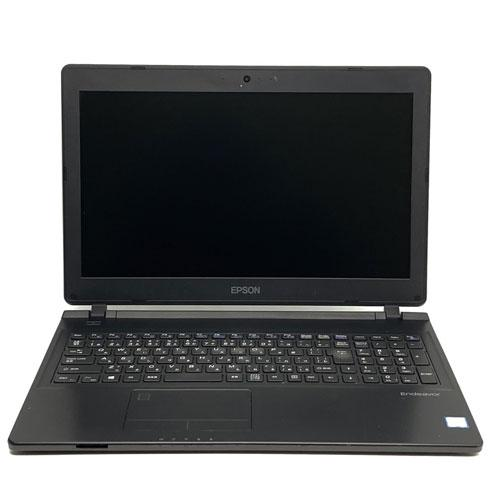
The Epson Endeavor NJ4300E is a desk-based business laptop configured for organisations that have shifted the majority of their data and application workloads to cloud or network infrastructure. With an Intel Core i3 processor, 8GB of RAM, and a 256GB hard disk drive, the NJ4300E is positioned as a lean endpoint device — one where local storage is deliberately modest because primary workflows operate through hosted environments rather than local file systems.
The Endeavor NJ4300E is distributed through Epson Direct within the Japan domestic business market, targeting corporate procurement teams managing standardised fleet deployments where per-unit cost control, manageability, and consistent hardware behaviour take priority over high-end individual specification.
Endpoint Performance in a Cloud-Dependent Architecture
The Intel Core i3 processor provides the compute capacity the NJ4300E requires for its intended role. As a front-end client device accessing cloud-hosted applications, browser-based platforms, and network-streamed services, the NJ4300E’s processing demands are substantially lower than those of a locally compute-dependent workstation. The Core i3’s dual-core, four-thread architecture handles concurrent browser sessions, communication platforms, and office application use without performance degradation under typical office loads.
Intel UHD Graphics, integrated into the processor, supports standard display output and media rendering. Furthermore, the Core i3 platform’s efficient power draw reduces per-device energy consumption — a relevant factor in large office deployments where aggregate electricity costs across a managed fleet are a procurement consideration.
Memory Allocation for Thin-Client Workflows
The NJ4300E is equipped with 8GB of DDR4 RAM. For cloud-first deployments — where applications run remotely and the local machine primarily handles browser rendering, UI interactions, and communication tools — 8GB represents a practical allocation. Consequently, users operating within SaaS-based ERP systems, hosted virtual desktops, web-based CRM platforms, and browser-delivered productivity suites will find 8GB sufficient for their concurrent session requirements.
For organisations evaluating fleet-wide memory specifications, 8GB also aligns with the minimum recommended allocation for Windows 10 Pro and Windows 11 Pro under standard managed deployment profiles, keeping software licensing and OS performance requirements met without over-provisioning hardware.
Local Storage in a Network-Storage Context
The 256GB hard disk drive reflects the NJ4300E’s positioning as a cloud-first endpoint. Where primary file storage resides on network drives, SharePoint, or cloud object storage, local storage functions primarily as an OS and application host rather than a data repository. The 256GB volume accommodates the operating system, standard business application installations, browser cache, and a working buffer for temporary local files.
This storage approach shifts data management responsibility to centralised infrastructure, which in turn simplifies backup, compliance, and data governance for IT administrators managing large device fleets. It is worth noting, however, that the HDD’s mechanical nature introduces longer boot times and slower application launch sequences compared to SSD-based alternatives. Organisations with strict endpoint responsiveness requirements should evaluate SSD configurations where available.
Display for Full-Day Desk Use
The 15.6-inch Full HD (1920 × 1080) display is a practical choice for the NJ4300E’s primary deployment context. Office staff using the device for sustained periods benefit from the larger screen area, which reduces the need for an external monitor in many single-screen desk configurations. Side-by-side window layouts, extended spreadsheet views, and multi-tab browser environments are all more comfortable on a 15.6-inch panel than on 13-inch or 14-inch alternatives.
The anti-glare panel coating reduces reflections under fluorescent office lighting, which is the primary ambient condition for the NJ4300E’s expected deployment environment. Additionally, the 15.6-inch form factor supports a full-size keyboard layout. Select configurations include a numeric keypad — a meaningful ergonomic consideration for roles that involve sustained numerical data entry into ERP, accounting, or logistics systems.
Wired Connectivity as a Fleet Deployment Advantage
For managed office environments, the NJ4300E’s wired network port is a significant practical asset. RJ-45 Gigabit Ethernet provides stable, policy-compliant network access without the variability of wireless connections. In corporate environments where network security policy favours or mandates wired connections for data access, the built-in Ethernet port removes the need for USB adapters across the fleet.
The full port selection supports standard office peripheral configurations:
- USB-A (3.0 / 3.1) — connects keyboards, mice, printers, and storage peripherals
- USB-C — supports data transfer and charging on compatible accessories
- HDMI — enables external display connection for dual-screen setups or projector use in meeting rooms
- SD card reader — supports media import and peripheral device compatibility
- 3.5mm audio combo jack — connects headsets for video conferencing and voice communication
- RJ-45 Ethernet — wired LAN for stable, managed network access
- Kensington lock slot — physical security for open-plan and shared desk environments
Wi-Fi 5 (802.11ac) and Bluetooth provide wireless connectivity where wired access is unavailable or impractical.
Security for Standardised Fleet Management
The NJ4300E includes the security features required for standard corporate endpoint deployment:
- TPM 2.0 — hardware-based encryption supporting BitLocker and secure boot configurations
- BIOS password support — restricts unauthorised firmware-level access across managed devices
- Windows Hello compatibility — supports PIN-based and biometric login depending on peripheral configuration
- Kensington lock slot — physical restraint suitable for shared office and hot-desk environments
For IT administrators managing device fleets through MDM platforms, the NJ4300E’s standardised hardware profile simplifies policy application and imaging consistency across units.
Power and Operational Continuity
The NJ4300E is designed for desk-based operation with periodic mobility between office locations. Battery runtime of approximately 6–8 hours under mixed office use covers standard working hours with access to power at the primary desk. The Core i3 processor’s efficient power profile contributes to stable thermal behaviour and consistent fan noise levels during sustained use — relevant in open-plan office environments where acoustic comfort is a consideration.
Ideal Users
The Epson Endeavor NJ4300E at this specification is well-suited for the following deployment profiles:
- Large-scale corporate fleet deployments — The NJ4300E’s controlled specification tier supports cost-efficient standardised procurement. Uniform hardware across a fleet simplifies imaging, driver management, and hardware support. The 256GB HDD and 8GB RAM configuration aligns with cloud-first IT strategies where local resources are intentionally kept lean.
- Back-office and administrative operations — Staff processing transactions, managing records, and operating browser-based enterprise platforms require consistent access and display comfort rather than local compute power. The 15.6-inch display and full keyboard layout reduce ergonomic strain across full working days.
- Accounting and finance teams using hosted ERP systems — Cloud-hosted ERP, accounting, and reporting tools place minimal demands on local hardware. The numeric keypad available on select NJ4300E configurations directly supports data entry workflows. 8GB RAM handles concurrent sessions across ERP, spreadsheet tools, and communication platforms.
- Reception, logistics, and operations coordinators — Fixed-desk roles operating scheduling, order management, and communication platforms benefit from the large display, wired Ethernet stability, and full-size keyboard. The 256GB local storage footprint keeps data centralised on managed infrastructure rather than distributed across local drives.
- Education and public sector IT procurement — Environments with managed infrastructure, centralised application delivery, and budget constraints per seat are well-served by the NJ4300E’s specification. The device meets baseline OS and application requirements while keeping acquisition costs controlled at scale.
Technical Specifications
Processor
| Attribute | Detail |
|---|---|
| Processor Family | Intel Core i3 |
| Architecture | Dual-core with Hyper-Threading (4 logical threads) |
| Graphics | Intel UHD Integrated Graphics |
Memory
| Attribute | Detail |
|---|---|
| Installed RAM | 8GB |
| Memory Type | DDR4 |
| Slot Configuration | SO-DIMM (upgrade subject to platform support) |
Storage
| Attribute | Detail |
|---|---|
| Storage Capacity | 256GB |
| Storage Type | HDD |
| Form Factor | 2.5-inch SATA |
Display
| Attribute | Detail |
|---|---|
| Screen Size | 15.6 inches |
| Resolution | 1920 × 1080 (Full HD) |
| Aspect Ratio | 16:9 |
| Touch | No |
| Panel Coating | Anti-glare |
Ports and Connectivity
| Attribute | Detail |
|---|---|
| USB-A | Multiple USB 3.0 / 3.1 ports |
| USB-C | Yes |
| HDMI | Yes |
| SD Card Reader | Yes |
| Audio | 3.5mm combo jack |
| Ethernet | RJ-45 Gigabit LAN |
| Wi-Fi | Wi-Fi 5 (802.11ac) |
| Bluetooth | Yes |
Security
| Attribute | Detail |
|---|---|
| TPM | TPM 2.0 |
| BIOS Security | BIOS password support |
| Windows Hello | Compatible (configuration-dependent) |
| Physical Lock | Kensington lock slot |
Power and Battery
| Attribute | Detail |
|---|---|
| Estimated Battery Life | Approximately 6–8 hours (mixed office use) |
| Charging Interface | AC power adapter |
Build and Compliance
| Attribute | Detail |
|---|---|
| Form Factor | Clamshell laptop |
| Screen Size Class | 15.6-inch full-size |
| Numeric Keypad | Available on select configurations |
| Operating System | Windows 10 Pro / Windows 11 Pro |
| Market | Japan domestic business market (Epson Direct) |
| Weight | Approximately 2.1 kg (configuration-dependent) |
Reviews
There are no reviews yet.