
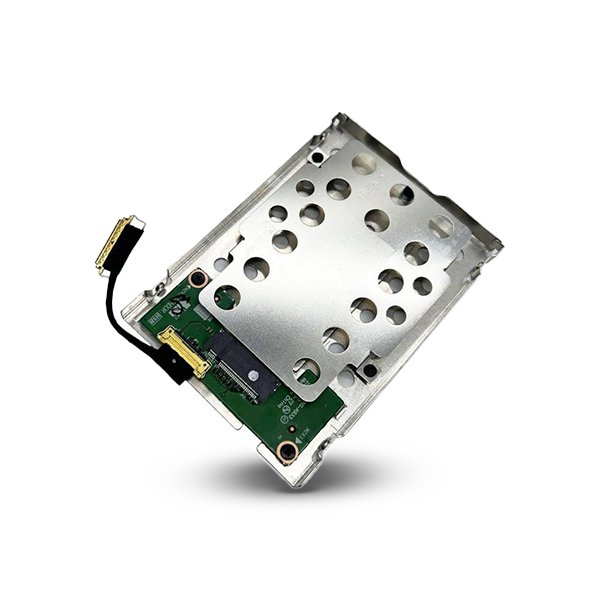


Generic M.2 SSD Bracket Caddy Tray
An M.2 SSD’s speed advantage means nothing if your desktop simply doesn’t have an M.2 slot to plug it into. Many older and budget desktop motherboards were built entirely around SATA and PCIe expansion slots, with no M.2 connector anywhere on the board. The Generic M.2 SSD Bracket Caddy Tray solves this exact limitation, letting you install a genuinely fast M.2 SSD into a system that was never designed to accept one — through either a standard PCIe slot or a 2.5-inch drive bay, depending on the tray configuration you need.
This is a genuinely practical, affordable adapter for anyone wanting to bring modern M.2 storage performance to an older or entry-level system without replacing the motherboard.
Bring M.2 Storage to Systems Without M.2 Slots
The Generic M.2 SSD Bracket Caddy Tray mounts your M.2 SSD securely and connects it either into an available PCIe slot on your desktop motherboard, or into a standard 2.5-inch drive bay via SATA, depending on the specific tray and your M.2 drive’s interface. This means a system without native M.2 support can still benefit from the dramatically faster storage performance an M.2 drive offers, rather than being limited to whatever storage interfaces the motherboard originally shipped with.
Wide M.2 Size Compatibility
Supporting common M.2 form factors including 2280, 2260, 2242, and 2230, the tray accommodates the vast majority of M.2 SSDs on the market, whether SATA-interface or NVMe-interface drives, giving genuine flexibility for whatever M.2 SSD you already own or plan to purchase.
Tool-Free, Straightforward Installation
Designed for effortless assembly without requiring specialized tools, the bracket lets you mount your M.2 SSD and install the complete tray into your system quickly, whether you’re upgrading an existing build or repurposing an unused PCIe slot or drive bay. This straightforward installation process removes the intimidation factor that often accompanies internal storage upgrades, making the process accessible even for users without extensive PC building experience.
Secure, Stable Mounting for Long-Term Reliability
Built from durable metal or plastic construction depending on the specific tray design, the bracket provides screw holes and mounting mechanisms that firmly secure the M.2 SSD in place, minimizing vibration and movement risk during operation. A firm locking system keeps the drive stable even during heavy, sustained workloads.
Heat Dissipation Features for Sustained Performance
Many tray designs include built-in heat-dissipating structures or ventilation features that help manage thermal buildup during high-speed operations, particularly relevant for NVMe drives capable of generating meaningful heat under sustained load. This thermal consideration helps maintain consistent drive performance rather than allowing heat-related throttling to undermine the speed advantage the M.2 drive was purchased for in the first place.
Space-Saving, Cost-Effective Storage Expansion
Rather than replacing an entire motherboard purely to gain M.2 support, this bracket lets you repurpose an existing PCIe slot or drive bay for high-speed storage expansion, delivering a genuinely cost-effective path to modern storage performance on systems that would otherwise require a complete platform upgrade.
The Practical Case for a Bracket Adapter
Replacing a motherboard purely to add M.2 support represents a significant cost and effort compared to the modest price of a properly designed bracket adapter. For custom PC builders, IT technicians upgrading client systems, or anyone repurposing an older desktop, this tray provides the missing link between an M.2 SSD’s genuine performance and a system that wasn’t originally built to accommodate one.
Perfect For
- Older desktops and motherboards without native M.2 slots
- Custom PC builders repurposing unused PCIe slots for additional high-speed storage
- IT technicians upgrading client systems without full motherboard replacement
- Users with a spare M.2 SSD wanting to install it in a system lacking M.2 support
- Budget system builds prioritizing storage speed without a premium motherboard
- Anyone consolidating storage upgrades without purchasing entirely new hardware
- Systems requiring additional storage expansion through available PCIe or drive bay slots
- Users upgrading or replacing storage who need quick, tool-free access for maintenance


Reviews
There are no reviews yet.